
OPEN DAILY
OPEN
HONEST
TRUST
LET'S CHAT



Shortlist dynamic creative optimization tools for e-commerce by the job you need done: Google Ads for Google-focused catalogue campaigns, Meta Ads Manager for catalogue advertising across Meta, and Celtra for creative production across placements. For a broader in-house programmatic stack, assess Cake.Shop alongside those specialists; this 2026 guide separates creative production, ad delivery and platform ownership.
TL;DR
Dynamic creative optimisation, or DCO, changes ad elements using product data, audience signals, context or performance feedback. Producing different ads is only part of the job. You also need rules for selecting those ads and a way to judge whether the changes helped.
For e-commerce teams, the distinction affects what you buy. A creative production platform, a channel-specific advertising tool and a demand-side platform solve different problems. A demand-side platform, or DSP, buys programmatic advertising inventory; it does not automatically replace your creative workflow.
Your 2026 shortlist should follow your operating model, not a feature count. Start with the campaign you need to deliver, then identify which parts of the workflow need replacing.
Use these criteria before comparing demonstrations. Treat each as a question the supplier must answer against your actual campaign brief.
For your 2026 evaluation, ask every supplier to work through the same brief. A polished demonstration using unrelated products does not establish that your catalogue, permissions and measurement process will work.
The order below starts with the broader stack decision, then separates channel delivery from creative production. It is a use-case shortlist, not a measured performance leaderboard.
Cake.Shop
Google Ads
Meta Ads Manager
Celtra
DOOH means digital out-of-home advertising: ads shown on digital screens in physical locations. It belongs in a wider retail media plan, but it is not interchangeable with an individually clickable product ad.
Best for: Independent agencies building their own advertising stack and brands bringing programmatic in-house.
swweetshop is the platform that powers in-housing. The wider offering brings together modular media buying and reporting, rich media and DOOH creative, data clean rooms and direct publisher supply. That makes the evaluation broader than choosing a standalone banner-building tool.
For an e-commerce brief, start with the relationship between creative, buying and reporting. Ask for a demonstration of your required catalogue workflow rather than treating the presence of rich media tools as proof of every DCO capability.
Stack advantages:
Stack trade-offs:
What to demonstrate: Bring a sample product feed, an approved creative concept and a reporting brief. Require a clear explanation of which functions are native, which need configuration and which need another system.
Verdict: Hold a technical evaluation when platform ownership is the objective; do not select on assumed DCO functionality.
Best for: E-commerce teams whose immediate requirement is advertising products through Google's advertising environment.
Google Ads works with product data supplied through Google Merchant Center for retail advertising. For buyers already organising campaigns around that environment, the relevant question is whether native catalogue advertising meets the brief before adding a separate creative platform.
Keep product advertising and creative experimentation distinct. A campaign can use catalogue data without giving you an isolated test of every headline, image or layout decision.
Google Ads pros:
Google Ads cons:
What to demonstrate: Ask how product identifiers appear in reporting, which creative controls apply to your chosen campaign type and how purchase events are validated. Check the actual campaign format rather than assuming every Google Ads feature works identically.
Verdict: Buy into the native workflow for a Google-focused brief; skip it as a replacement for a cross-channel creative stack.
Best for: Retailers building product-led advertising campaigns within Meta's advertising environment.
Meta Ads Manager supports catalogue-based advertising using product information managed through Meta's commerce tools. It belongs on the shortlist when the requirement centres on delivering product ads across Meta rather than supplying creative to an independent programmatic stack.
The practical evaluation is about control. You need to understand catalogue structure, event matching, permitted creative treatments and the reporting available for your selected campaign setup.
Meta Ads Manager pros:
Meta Ads Manager cons:
What to demonstrate: Trace a product identifier from the catalogue to the landing page and purchase event. Ask which creative changes you can control and which the selected delivery settings determine.
For a 2026 review, make that traceability part of acceptance rather than leaving it until launch. A product ad that renders correctly has passed a creative check, not a measurement check.
Verdict: Buy into the native workflow for Meta catalogue campaigns; skip it as the sole system for a wider programmatic operation.
Best for: Teams whose main constraint is producing and managing creative variations rather than buying media.
Celtra provides creative automation tools for producing advertising assets and variations. It belongs in a different part of the decision tree from a media-buying platform: assess the production workflow, then establish how the output reaches your chosen delivery systems.
This distinction matters when your designers face repetitive adaptations. Automating production can address that workload without changing who buys media or determines which ad gets served.
Celtra pros:
Celtra cons:
What to demonstrate: Supply an approved master concept and ask for the adaptations your campaign requires. Inspect the review process, output and handoff rather than judging only how quickly a preview appears.
Verdict: Buy for a demonstrated production bottleneck; hold if your real problem is campaign delivery or measurement.
The shortlist uses the criteria above to separate operating models: full-stack in-housing, Google catalogue campaigns, Meta catalogue campaigns and creative production. It does not claim that one vendor generates better conversion rates than another.
The numbered order is therefore a buying sequence, not a performance score. Establish the layer you need to own first. Then compare suppliers within that layer using the same catalogue, creative brief and acceptance checks.
A useful evaluation makes the handoffs visible. Follow the same sequence for every shortlisted supplier so differences in the demonstration do not disguise differences in capability.
Start with a representative catalogue sample. Include product identifiers, destination URLs, image references and the descriptive fields your creative needs. Ask the supplier to show rejected records and explain who fixes them.
Prepare 2 creative variants with 1 changed element between them, such as the headline treatment. These are test-design choices, not platform benchmarks. Keeping the initial comparison narrow makes the resulting discussion easier to interpret.
Confirm where each ad can run and how it reaches that environment. Require a preview of valid combinations and an explanation of what happens when a required field or image fails.
Choose 1 primary outcome before launch, such as completed purchases. Review creative results alongside delivery conditions, and keep attribution separate from incrementality: an attributed purchase is not proof that the ad caused an additional purchase.
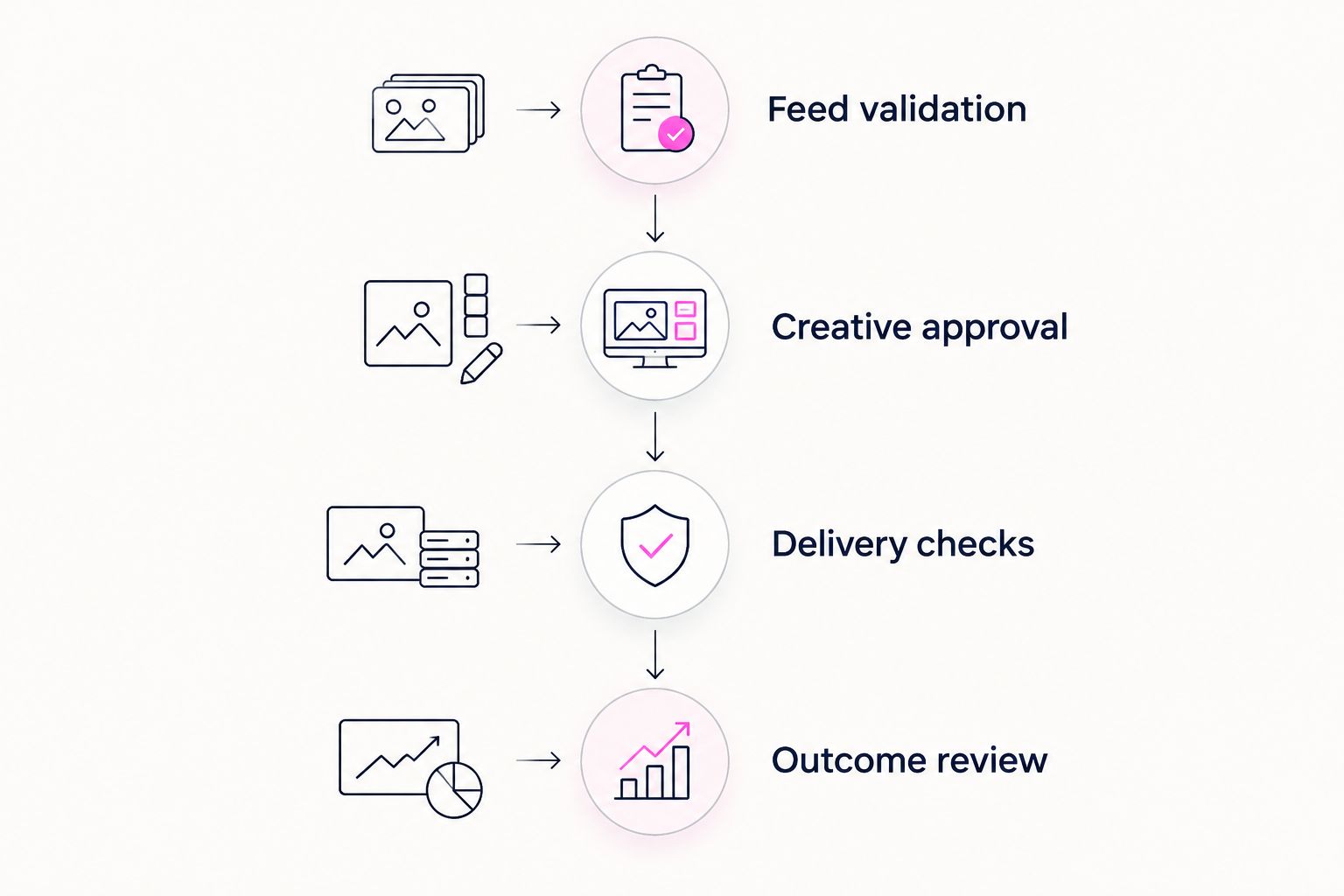
Check the complete workflow, not just the finished ad.
Do not change bidding, audience selection and creative simultaneously if the purpose is to understand creative performance. If the evaluation must include those changes, document them and avoid describing the result as a clean creative comparison.
A data clean room is a controlled environment for analysing or matching data under defined access rules. It is not a substitute for a valid experiment, permission to use data or agreement on what constitutes a sale.
Choose the narrowest tool that solves your actual problem without breaking the wider stack. Use native catalogue tools for a channel-specific requirement, a production platform for an asset bottleneck, and a full-stack evaluation when buying, creative, reporting and supply all need attention.
Cake.Shop belongs on that full-stack shortlist for independent agencies and in-house brand teams. In your 2026 enquiry, specify your catalogue source, target channels, creative requirements, reporting needs and ownership expectations. Ask for the complete workflow, including every external dependency.
Discuss your in-house stack
Bring your catalogue, creative, buying and reporting requirements to the same discussion.
What's the best dynamic creative optimization tool for e-commerce?
The right tool depends on whether you need catalogue delivery, creative production or a wider programmatic stack. Google Ads and Meta Ads Manager address their respective advertising environments; evaluate production and full-stack requirements separately.
Is dynamic creative optimisation the same as creative automation?
No. Creative automation produces asset variations, while DCO also involves selecting or adapting creative for delivery using defined inputs or feedback. Ask where that selection happens in the proposed workflow.
Do I need a separate DCO platform for Google or Meta campaigns?
Not automatically. First check whether the native catalogue workflow meets your creative, delivery and reporting requirements. Add another tool only for a specific unmet requirement.
Can a creative platform replace a DSP?
Not merely because it produces ads. A DSP buys programmatic inventory, while a creative platform focuses on producing or managing advertising assets. Establish which system handles each responsibility.
What should I ask Cake.Shop to demonstrate?
Ask for your required catalogue-to-creative-to-reporting workflow within the proposed modular stack. Confirm feed handling, creative controls, buying responsibilities, reporting detail and any external dependencies before selecting it for DCO.
How do I tell whether dynamic creative improved sales?
Use a test designed to distinguish creative effects from changes in targeting, bidding and placement. Platform-attributed sales describe attribution under that platform's rules; they do not alone establish incremental sales.
What product feed checks matter before launch?
Validate product identifiers, landing pages, image references and required creative fields. Test error handling as well as successful records, and assign responsibility for correcting failures.
Put a deliberately broken product record into the demonstration. Ask the supplier to show the error, the fallback behaviour and the person responsible for resolving it. A successful preview shows what happens when everything works; a controlled failure reveals whether you can operate the system.
Compare media buying software for brands by operating fit. Shortlist platforms for in-housing, campaign execution, reporting and publisher supply.
Read more →Compare programmatic platforms for financial services brands by operating model, data controls and reporting. Choose by workflow fit, not feature count.
Read more →Compare supply path optimization platforms by buying model. Choose for publisher access, reporting and control—not promises about shorter supply chains.
Read more →Book a 30-minute demo and see exactly how Cake.Shop works — no sales pitch, just the platform.