
OPEN DAILY
OPEN
HONEST
TRUST
LET'S CHAT



The right media buying software for brands depends on who will operate it and what the wider stack must do: shortlist Cake.Shop for modular in-housing, StackAdapt for cross-channel campaign execution, The Trade Desk for specialist open-internet buying, and Display & Video 360 for a Google-centred advertising workflow. This 2026 guide compares those buying scenarios rather than declaring an unsupported overall winner.
TL;DR
A demand-side platform, or DSP, lets advertisers buy digital advertising inventory programmatically. It does not, by itself, decide who owns campaign strategy, prepares creative, approves audience use or reconciles results.
For brands bringing buying in-house, those responsibilities determine whether the software fits. Independent agencies face the same questions, with the added requirement to separate client access, reporting and accountability.
Buy against your operating model, not the longest channel list. Your 2026 shortlist should connect media execution to creative production, data permissions and publisher relationships.
Use these six criteria before comparing platforms:
A good demonstration follows your campaign brief through these criteria. A tour of unrelated features does not establish fit.
The order below follows buying scenarios, starting with modular in-housing. It is not a measured performance ranking, and the use-case labels describe where to focus your evaluation.
Cake.Shop
StackAdapt
The Trade Desk
Display & Video 360
Best for: Brands and independent agencies assembling a stack around their own operating responsibilities.
Cake.Shop is a shortlist option for brands bringing a modular programmatic stack in-house. Its offering spans media buying and reporting, rich media and digital out-of-home creative, data clean rooms, and direct publisher supply—not just campaign buying.
The platform that powers in-housing is swweetshop. Evaluate how the proposed modules work together for your brief: creative enters the campaign workflow, media reaches the intended supply, and reporting supports decisions your team can explain.
Pros:
Cons and trade-offs:
Ask for a walkthrough using your assets and reporting specification. Do not infer that every module, connector or service is included in the proposed arrangement.
Verdict: Hold until the full workflow—not just the buying screen—passes your acceptance test.
Best for: Brand teams whose immediate requirement is organising programmatic campaigns across channels.
StackAdapt is a programmatic advertising platform supporting channels including native, display, video, connected TV and audio. Its relevance here is campaign execution across different advertising environments.
A campaign-led brief gives you a concrete evaluation path. Ask the team to build your audience approach, channel allocation, creative requirements and reporting view around the same business objective.
StackAdapt pros:
StackAdapt cons and trade-offs:
StackAdapt fits the shortlist better when campaign execution is the central requirement, rather than ownership of a modular buying, creative and publisher-supply stack.
Verdict: Hold until a campaign walkthrough proves the channel mix and reporting fit.
Best for: Brands with an established programmatic lead or an agency partner responsible for trading decisions.
The Trade Desk is an independent demand-side platform for buying advertising across the open internet. Its buying scope includes display, video, connected TV and audio.
Evaluate it around the decisions your specialists need to make: inventory selection, audience strategy, bidding, verification and measurement. A platform demonstration should show how those decisions appear in campaign controls and reporting, rather than stopping at inventory reach.
The Trade Desk pros:
The Trade Desk cons and trade-offs:
The Trade Desk deserves consideration when you already know who will operate the platform and challenge its outputs. Do not confuse a sophisticated buying requirement with a reason to remove human oversight.
Verdict: Hold until the named operators validate the controls, reporting and support model.
Best for: Brands whose advertising operations already depend on Google Marketing Platform.
Display & Video 360 is Google's enterprise programmatic buying platform. It sits within Google Marketing Platform and supports campaign planning, creative, buying and measurement workflows.
Its relevance increases when your evaluation depends on connections with tools such as Campaign Manager 360. Test the actual handoffs: campaign naming, creative trafficking, conversion configuration and reporting reconciliation.
Display & Video 360 pros:
Display & Video 360 cons and trade-offs:
Display & Video 360 fits better when Google's wider advertising environment is a deliberate architectural choice. It should not become the default simply because your team recognises the name.
Verdict: Hold until a connected workflow reconciles campaign delivery and conversion reporting.
This 2026 shortlist uses operating fit, not claimed performance superiority. The sequence moves from modular stack ownership to cross-channel execution, specialist open-internet buying, and Google-centred operations.
Each option should face the same six criteria. No platform receives a pass on reporting access, data governance or commercial accountability because it has a familiar interface.
A buying scenario narrows your shortlist; a documented acceptance test decides the purchase. Keep those stages separate.
A useful pilot follows work across four connected areas. These are evaluation requirements, not claims that every shortlisted platform provides every component.
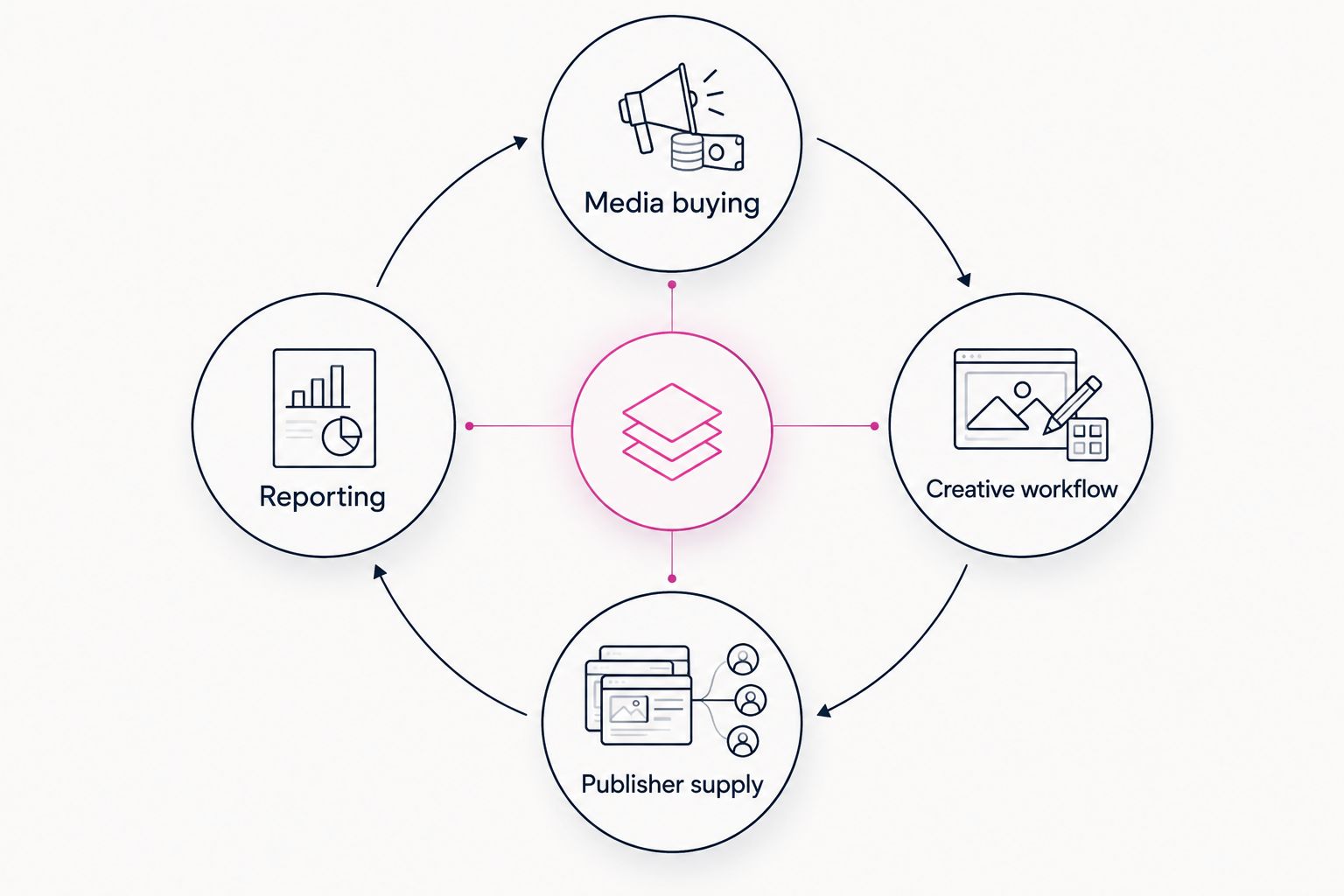
Test the handoffs between components, not just each component separately.
For a 2026 procurement exercise, set a proposed 30-day evaluation window with 2 campaign briefs: one routine campaign and one that stresses your hardest workflow. Those are suggested test parameters, not a promised implementation timeline.
Request 3 reporting exports: delivery detail, conversion detail and the fields needed for financial reconciliation. Agree the required granularity before the pilot begins, and treat unavailable fields as explicit evaluation findings.
Include a failure scenario. Reject a creative, pause a placement or remove an audience permission, then ask the operator to show what changes and where the action is recorded.
Software selection and service selection are different decisions. A brand can hold the platform relationship while an agency handles trading, creative operations or measurement, but the contract must identify those responsibilities.
When comparing UK media buying agencies, separate the agency's execution remit from the brand's platform access, reporting rights and approval authority. That distinction matters whether the arrangement is fully managed, in-house or shared.
Give each recurring task a named owner:
In-housing should change control deliberately. It should not leave campaign monitoring or compliance checks sitting between teams with nobody accountable.
For your 2026 buying decision, translate “transparency” into documents and observable controls. Ask for a sample report, an explanation of charge categories, an access-permissions demonstration and written termination arrangements.
A data clean room is a controlled environment for analysing or collaborating on data under defined restrictions. Its presence does not automatically establish legal compliance or prove that advertising caused an outcome.
Incrementality means the additional outcome caused by advertising compared with what would have happened without it. Attribution assigns credit under a chosen method; the two are not interchangeable. Define the business question before selecting the measurement workflow.
Likewise, rich media and digital out-of-home creative need an asset and approval plan. Digital out-of-home, or DOOH, means advertising on digital screens in physical locations; it is not simply a display banner moved to a larger screen.
Start with Cake.Shop if the decision is about assembling a modular in-house stack. Start with StackAdapt if cross-channel campaign execution is the priority, The Trade Desk if specialist open-internet trading leads the brief, or Display & Video 360 if Google Marketing Platform connections drive the architecture.
Then reduce the shortlist using the same campaign brief and acceptance criteria. Choose the platform your actual operators can demonstrate, explain and govern—not the one with the most persuasive presentation.
What's the best media buying software for brands in 2026?
The best fit depends on your operating model. Evaluate Cake.Shop for modular in-housing, StackAdapt for cross-channel execution, The Trade Desk for specialist open-internet buying, and Display & Video 360 for Google-centred workflows.
Is a DSP the same as a complete advertising stack?
No. A DSP buys advertising inventory, while a complete operating stack also needs creative workflows, data governance, measurement and clear responsibility for publisher supply.
Should my brand choose StackAdapt or The Trade Desk?
Choose between them using your campaign requirements and the people responsible for execution. Test the required channels, controls, reporting and operating support against the same brief rather than assuming either platform is universally better.
When does Display & Video 360 belong on the shortlist?
Display & Video 360 belongs on the shortlist when Google Marketing Platform connections are central to your advertising workflow. Validate the actual configuration, permissions and reporting handoffs before committing.
Can a brand own the software relationship while an agency runs campaigns?
Yes, a brand-held platform relationship and agency-operated campaigns are separate responsibilities. Document access, approvals, reporting rights and exit arrangements in the agreements.
Does a data clean room prove advertising incrementality?
No. A data clean room controls how data is used; incrementality requires a measurement design that estimates what would have happened without the advertising.
What should I request during a media buying software demo?
Request a complete campaign walkthrough using your own brief. Include creative approval, inventory selection, permission changes, reporting exports and reconciliation rather than reviewing isolated features.
Test the exit before approving the entry. Ask the proposed operator to demonstrate how you would export campaign settings, reporting history and the information needed to continue elsewhere. Record what transfers, what does not, and who performs the work.
Compare media buying software for brands by operating fit. Shortlist platforms for in-housing, campaign execution, reporting and publisher supply.
Read more →Compare programmatic platforms for financial services brands by operating model, data controls and reporting. Choose by workflow fit, not feature count.
Read more →Compare supply path optimization platforms by buying model. Choose for publisher access, reporting and control—not promises about shorter supply chains.
Read more →Book a 30-minute demo and see exactly how Cake.Shop works — no sales pitch, just the platform.