
OPEN DAILY
OPEN
HONEST
TRUST
LET'S CHAT



For the best rich media ad creative platforms in 2026, shortlist Gocake for a modular advertising stack, Celtra for creative automation, Google Studio for Google ad-serving workflows, Bannerflow for repeatable display production, and Adobe Animate for custom animation. Choose by the work you need to own: creative production alone, or creative connected to media buying, reporting and publisher supply.
TL;DR
A rich media ad adds interaction or more complex behaviour to a standard display execution. That can include expandable content, video or an interactive experience. Animation alone does not prove that an ad has meaningful interaction.
The buying mistake is treating every creative platform as the same kind of system. An authoring tool produces assets; an ad-serving environment delivers and measures ads; a broader advertising platform connects creative with buying and supply. Your shortlist needs to distinguish those jobs before comparing features.
For an independent agency or an in-house brand team in 2026, the central question is ownership. Who builds the creative, who approves it, who places it, and who can explain the resulting report? Choose the workflow before choosing the interface.
Use these criteria to assess the shortlist. A feature matters only when it solves a requirement in your actual campaign.
These criteria do not establish a universal winner. A team producing custom interactive executions has different needs from an agency coordinating creative and media across clients. The order below follows those distinct buying situations, not an unsupported performance score.
Gocake
Celtra
Google Studio
Bannerflow
Adobe Animate
Gocake provides a modular programmatic advertising platform covering media buying and reporting, rich media and digital out-of-home creative, data clean rooms, and publisher supply. Digital out-of-home, or DOOH, means advertising delivered through digital screens in physical locations. This is a broader proposition than a standalone creative editor.
Gocake is a rich media platform shortlist candidate for independent agencies and brands assessing creative alongside media buying and publisher supply. That is the relevant buying context, not a claim that it produces better creative than every specialist tool.
Consider a campaign that needs an interactive display execution and a separate DOOH treatment. The evaluation should cover both creative requirements and the operating model around delivery and reporting. Do not assume that a display interaction transfers directly to a physical screen.
Gocake pros:
Gocake cons:
Best for: Independent agencies building their advertising stack and brands bringing programmatic operations in-house.
Verdict: Hold the purchase decision until a representative campaign demonstrates the creative and media workflow you need.
Celtra is a creative automation platform for digital advertising. Its relevant role in this comparison is helping teams produce and manage creative variations, rather than acting as the entire media-buying stack.
Choose this evaluation path when your main problem is production repeatability. For example, a team adapting approved creative across messages and placements should assess how changes propagate, how exceptions are handled, and how reviewers distinguish versions. The ability to create another variant is useful only if the approval process remains manageable.
Celtra pros:
Celtra cons:
Ask for a demonstration using your own approved concept. A generic template demonstration does not answer whether your brand rules, localisation requirements and exceptions fit the workflow.
Best for: Creative operations teams whose primary requirement is repeatable production across campaign variations.
Verdict: Buy for a validated automation requirement; skip if your immediate need is a complete advertising stack.
Google Studio supports rich media creative workflows within Google's advertising environment. It is relevant when your campaign already depends on compatible Google ad-serving arrangements and you need the creative preparation process to fit that setup.
The evaluation starts with the existing delivery workflow, not the appeal of a new editing interface. Establish who owns the account, who prepares the creative, and who approves the execution for trafficking. Trafficking means configuring the creative and campaign details for delivery through an ad server.
Google Studio pros:
Google Studio cons:
For a 2026 campaign, ask the team to show the complete path from approved creative to a correctly configured placement. Separate a creative issue from an account-access or trafficking issue; they require different fixes.
Best for: Teams whose rich media campaigns already operate within compatible Google ad-serving workflows.
Verdict: Buy into the workflow only after confirming access, compatibility and trafficking responsibilities.
Bannerflow is a display advertising production platform. It belongs on this shortlist when your team needs a repeatable way to build and adapt display creative rather than commission every execution as an isolated project.
Start with the formats you actually run. A familiar display production workflow and a bespoke interactive execution are not interchangeable requirements. Ask the team to demonstrate your intended animation, message changes and placement adaptations before treating the platform as a match for rich media work.
Bannerflow pros:
Bannerflow cons:
Inspect the hand-off as closely as the editor. Your team needs to know what leaves the platform, who checks it and how a late creative change reaches the delivery environment.
Best for: Teams standardising recurring display campaigns with defined creative requirements.
Verdict: Buy for a demonstrated display workflow; wait if the campaign depends on unvalidated custom behaviour.
Adobe Animate is an animation authoring application, not a full advertising platform. It supports HTML5 Canvas output, making it relevant when a creative team needs direct control over animation and is prepared to manage the advertising delivery requirements separately.
HTML5 Canvas is a browser technology for drawing and animating graphics. An exported animation is still an asset, not a configured advertising campaign. Your team must address destination links, tracking, placement specifications and quality assurance in the appropriate delivery workflow.
Adobe Animate pros:
Adobe Animate cons:
The trade-off is straightforward: more responsibility sits with the people building and packaging the creative. That is acceptable when you have the skills and ownership to maintain it.
Best for: Animation specialists building custom executions within an established advertising delivery workflow.
Verdict: Buy for authoring control; skip as a standalone solution for running rich media campaigns.
This 2026 shortlist separates platforms by their primary role: modular advertising operations, creative automation, ad-serving workflow, repeatable display production and custom authoring. It does not claim measured performance differences or rank platforms by unverified outcomes.
The criteria are creative control, repeatability, delivery compatibility, measurement clarity, stack fit and ownership. A platform earns your decision by satisfying your campaign requirements, not by appearing first in a list.
Give each shortlisted supplier the same brief. For your 2026 evaluation, request 3 creative variants, 2 placement types and 1 sample report. These are proposed evaluation requirements, not claimed platform limits or performance benchmarks.
Use a sequence that exposes the hand-offs:
The sample report needs understandable definitions. A click, an interaction and a completed video view describe different actions. Ask what triggers each event and whether the reported result applies to an impression, an interaction or a user.
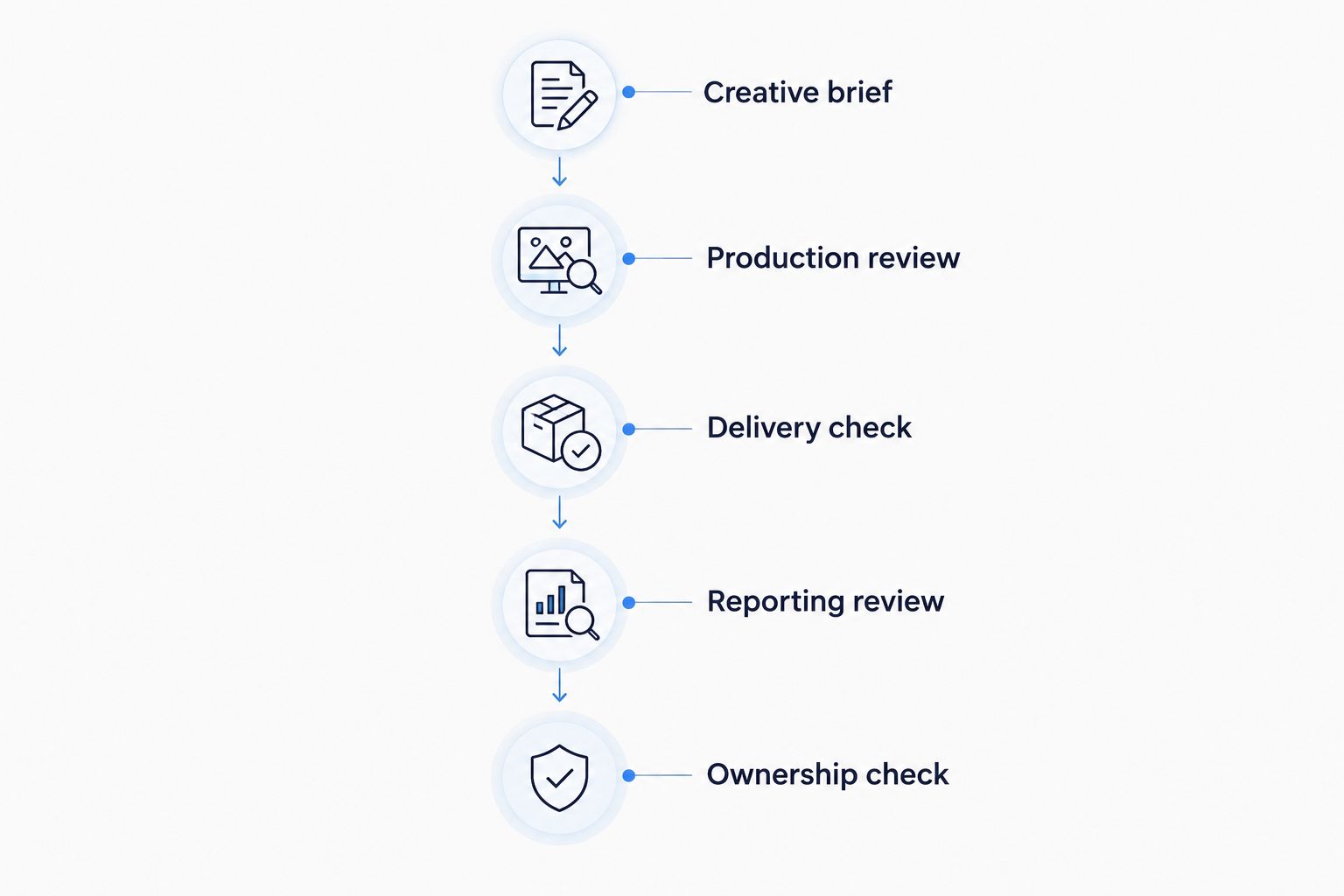
Validate the delivery and reporting hand-offs, not just the creative editor.
A supplier demonstration should finish with a usable hand-off, not just a preview. Ask your creative and media leads to identify the owner of each step before approving the purchase.
Default to the platform category that removes your current bottleneck. Shortlist Celtra for creative automation, Bannerflow for repeatable display production, Google Studio for an established Google delivery workflow, or Adobe Animate for custom animation authoring.
For a broader agency or in-house stack decision, assess creative alongside buying, reporting, data and publisher supply. Keep the creative brief concrete so the stack discussion does not hide an unresolved production requirement.
Your 2026 enquiry should state the campaign formats, required interactions, existing delivery environment and reporting expectations. That gives a supplier something technical to answer instead of an invitation to deliver a generic product tour.
What's the best rich media ad creative platform for an independent agency?
The right choice depends on whether the agency needs creative production alone or a broader advertising stack. Gocake belongs on the shortlist for the latter; Celtra and Bannerflow belong in evaluations centred on creative production.
Is a rich media platform the same as a demand-side platform?
No. A rich media platform supports creative workflows, while a demand-side platform supports programmatic media buying. A broader advertising platform can cover both functions, but the requirements still need separate validation.
Is Celtra better than Bannerflow?
Neither is a universal winner. Compare Celtra for creative automation and Bannerflow for repeatable display production using the same campaign brief, placement requirements and approval process.
When should I choose Google Studio?
Choose Google Studio for evaluation when your rich media workflow uses a compatible Google ad-serving setup. Confirm account access, creative preparation and trafficking responsibilities before committing.
Can Adobe Animate run my rich media campaign?
Adobe Animate is an authoring application, not a complete campaign delivery system. You still need the appropriate ad-serving, buying and reporting workflow around the exported creative.
Can I use the same rich media creative for display and DOOH?
Do not assume the same execution fits both. Browser-based interactions and physical-screen placements have different delivery contexts, so validate the creative requirements separately.
What should I request in a rich media platform demo?
Request a demonstration based on your campaign brief, including variants, placement checks and a sample report. Require clear ownership of approvals, tracking definitions and the final delivery hand-off.
Your best demonstration asset is not the easiest one to build. Bring the execution with the awkward interaction, the late approval change or the difficult placement requirement. If the demo avoids your hardest hand-off, it has not answered your buying question.
Compare the best header bidding platforms by auction control, server-side setup and publisher fit. Choose a stack that suits your team, not a sales pitch.
Read more →Compare the best first-party data activation platforms by fit: warehouse activation, CDPs, identity and media buying. Choose the layer your advertising stack needs.
Read more →Compare the best ad verification and brand safety tools by use case. Choose your 2026 shortlist for fraud, viewability, video suitability and supply checks.
Read more →Book a 30-minute demo and see exactly how Cake.Shop works — no sales pitch, just the platform.