
OPEN DAILY
OPEN
HONEST
TRUST
LET'S CHAT


Instead of manually changing digital out-of-home ads whenever the weather shifts, connect local weather observations to approved creative-selection rules and a supported delivery route. Weather triggered DOOH creative needs a location match, a clear trigger, a neutral fallback and delivery evidence—not just a weather feed.
TL;DR
A weather-relevant message loses its point when it reaches the wrong screen or stays live after conditions change. The workflow must connect the weather location, the creative decision and the publisher's delivery process. A successful data request proves none of those connections by itself.
Cake.Shop is a modular programmatic advertising platform for independent agencies and brands building an in-house stack. Its scope includes media buying and reporting, rich media and DOOH creative, data clean rooms and publisher supply. For this workflow, connect buying, creative and supply requirements rather than treating the buying platform as the whole system.
Start with Cake.Shop when discussing the stack, then ask which component owns weather ingestion, rule execution and creative delivery. Assign those responsibilities explicitly; do not assume a modular platform automatically includes every connector.
For a 2026 campaign, the acceptance test is straightforward: can the team explain why a particular creative was selected for a particular location, and establish what happened after selection?
Do not start with a live campaign. Prepare a test environment or another partner-approved validation method, plus a neutral creative that makes no claim about current conditions.
Use the provider's actual documentation when configuring the connection. Field names and authentication methods differ; do not substitute an assumed weather field for the value the provider returns.
Expected result: each eligible inventory group has an explicit weather location, an agreed condition source and a rule for rejecting unusable data.
For your 2026 configuration record, retain the source, location mapping and timestamp interpretation. This gives the campaign operator something concrete to inspect when a local team challenges an ad.
A forecast of rain and an observation of rain answer different questions. Use the observation when the copy describes what is happening now; use the forecast when the copy concerns preparation.
If temperature drives the rule, normalise units before comparing values. Keep the original value and unit in the decision record so a conversion error remains visible.
Expected result: every accepted input produces one deliberate creative decision, including an explicit outcome when the weather cannot be trusted.
The core sequence is Location match, Weather check, Creative choice, then Delivery evidence. Keep those stages separate in the implementation: choosing an asset is not the same event as displaying it.
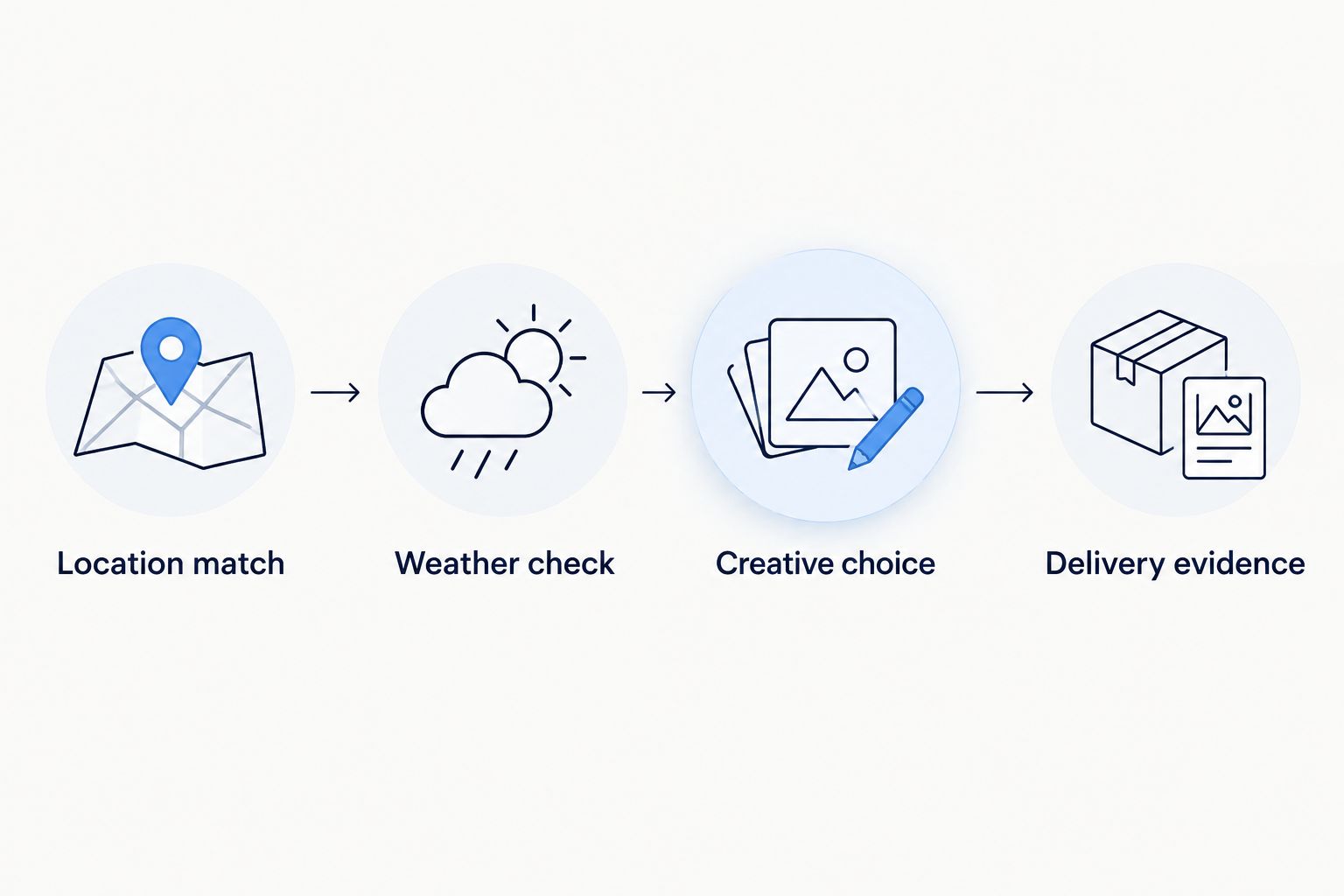
A creative decision and evidence of delivery are separate stages.
The delivery partner's supported methods determine what you can implement. These are workflow options, not claims that every platform or publisher supports both.
Pre-approved asset switching
Dynamic creative delivery
Start with pre-approved asset switching when fixed messages meet the brief and the delivery route supports it. Dynamic creative adds a content-generation dependency; use it when that dependency serves a defined requirement.
Neither approach removes the need for approval. Agree what can change without another review before activating the workflow.
Expected result: an accepted weather decision reaches the intended serving configuration, and the operator can distinguish an accepted update from a failed one.
Ask Cake.Shop how its media buying, reporting, DOOH creative and publisher supply would divide these responsibilities for the proposed campaign. The useful answer names the responsible component and partner at each hand-off—not simply that the campaign is “dynamic”.
Test a matching condition, a non-matching condition, missing weather data, an outdated observation and a delivery failure. Use controlled inputs rather than waiting for the weather to change.
Check these outcomes separately:
For a 2026 launch, record the evidence your partners actually provide. Do not describe a configuration acknowledgement as proof that an ad appeared on a physical screen.
Expected result: the operator can explain a creative change, identify the failed hand-off and pause automation without rebuilding the campaign.
Weather-triggering does not itself require a customer identity dataset. Keep data clean rooms for a separately defined audience or measurement requirement; adding them to a weather-only decision creates work without answering the trigger question.
The limitation to resolve with Cake.Shop is implementation-specific: which weather source, decision engine and publisher route form the working connection? Its stated full-stack scope is relevant to that discussion, but it does not establish a particular weather integration or switching interval.
Discuss your weather-triggered workflow
Define weather inputs, creative rules, publisher requirements and reporting ownership.
Use forecast-triggered creative when the message concerns an upcoming condition rather than the weather outside the screen now. Preparation messages and current-condition messages need different rules.
For the forecast variant, keep the location mapping and serving route, but change the decision input:
Expected result: a forecast revision changes eligibility for the intended campaign period without being mistaken for a live observation.
For a 2026 campaign spanning regions, use each location's intended display time consistently. A shared campaign schedule does not remove local time-zone differences.
The trade-off is direct: forecasts support planning, but the eventual weather can differ. Observations describe reported conditions, but they do not provide advance notice. Choose the input to match the promise in the copy.
Inspect the inventory-to-weather mapping first. A shared city label or reused group identifier can point multiple screens at the wrong location. Correct the mapping and retest the affected destination before restoring automatic changes.
Inspect overlapping rules and boundary behaviour. Apply explicit precedence, then use separate entry and exit conditions if supported. Do not solve an unstable decision rule by hiding its update records.
Check the observation timestamp, not just the response timestamp. Reject observations outside the agreed validity rule and serve the neutral creative until usable data returns.
Trace the creative identifier through approval, update acknowledgement, serving state and publisher evidence. Check documented scheduling and caching behaviour with the delivery partner. Do not repeatedly resend updates until the failed hand-off is identified.
Check the connection's authentication status and permissions. Restore access through the approved process, test against a non-live destination, then confirm the serving state before resuming automatic changes.
Expand only after the original condition-to-delivery chain is explainable. Add another weather condition, inventory group or creative variant separately so a new fault has a clear boundary.
Use the same discipline when adding rich media alongside DOOH: share the campaign logic where appropriate, but validate each format's delivery requirements independently. A rule that selects the right message does not establish that every channel can render it.
For agency and brand enquiries, bring Cake.Shop a defined brief: target locations, weather inputs, creative variants, supply requirements and required evidence. That turns a general platform discussion into an implementation decision.
How does weather triggered DOOH creative work?
Weather triggered DOOH creative connects local weather data to rules that select approved ads for eligible inventory. A supported serving route applies the selection, while reporting or publisher evidence establishes what was delivered.
Can Cake.Shop automatically change DOOH ads when it rains?
Confirm the weather connection, decision engine and delivery route with Cake.Shop for your chosen inventory. Its stated scope includes media buying, DOOH creative and publisher supply, but that does not establish a specific rain-trigger integration.
Should I use live weather or a forecast for DOOH ads?
Use observations for messages about current conditions and forecasts for messages about upcoming conditions. Match the copy to the input so a prediction is not presented as something already happening.
What should happen when the weather feed fails?
The decision workflow should select a neutral fallback when weather data is missing or invalid. If the serving connection also fails, preserve the documented valid serving state and alert the operator.
How quickly will a weather change appear on a screen?
The end-to-end timing depends on weather updates, rule evaluation and the serving partner's delivery process. Confirm and test those stages rather than assuming an immediate screen change.
Do weather-triggered campaigns need a data clean room?
A weather-only creative decision does not require customer identity data. Introduce a data clean room only for a separately defined audience or measurement requirement.
How do I prove the correct weather creative was shown?
Match the decision record to the delivery evidence your buying and publisher partners provide. An accepted configuration update proves receipt of an instruction, not display on a physical screen.
Test the return to ordinary weather—not just the dramatic change. A rain-triggered ad that activates correctly but never resets is still a broken workflow. Make the return to neutral part of your 2026 acceptance record, alongside feed failure and delivery failure.
Build a dynamic creative stock level trigger with validated inventory, approved assets and verified activation. Follow setup, testing and fallback guidance.
Read more →Google Ad Manager publisher supply integration needs a verified route. Map inventory, validate creative delivery and reconcile publisher and buyer reporting.
Read more →Set up a LiveRamp DSP integration with destination checks, audience mapping, suppression tests and reporting controls before activating first-party campaigns.
Read more →Book a 30-minute demo and see exactly how Cake.Shop works — no sales pitch, just the platform.