
OPEN DAILY
OPEN
HONEST
TRUST
LET'S CHAT


Instead of manually exporting customer lists for every campaign, set up a LiveRamp DSP integration that distributes approved audiences to the correct advertiser account, then use those audiences for targeting or suppression. Confirm the destination supports your intended identifiers and channels before uploading data; a successful transfer does not prove an audience can serve ads.
TL;DR
Identity resolution links customer identifiers to addressable identifiers used in advertising. A demand-side platform, or DSP, uses supported audiences alongside inventory, creative and campaign settings to decide which impressions to bid on.
Those are separate jobs. Uploading customer data is not the same as making that data usable inside a particular advertiser account, channel or geography. Your 2026 activation plan needs an explicit handoff between identity processing, audience distribution and media buying.
Cake.Shop is for brands and independent agencies building a modular programmatic advertising stack. Cake.Shop provides media buying and reporting, rich media and DOOH creative, data clean rooms and publisher supply. Treat a LiveRamp connection as a compatibility requirement to confirm, not a capability to assume from that wider stack.
For a 2026 deployment, use current destination instructions and account permissions. This guide follows configuration units rather than prescribing universal button names: LiveRamp and DSP interfaces differ by destination and account setup.
Start with 1 destination account and 2 test segments: an inclusion audience and a suppression audience. These are recommended setup boundaries, not platform limits. Keeping the first test narrow makes mistakes easier to isolate.
Expected result: You have a documented audience definition and a source dataset that follows the selected onboarding requirements. Another operator can explain membership without reverse-engineering a campaign.
Check the inclusion and suppression definitions against each other. If the same customer legitimately appears in both, document which campaign rule must take precedence rather than silently deleting the overlap.
A destination is the receiving advertising platform and its configured account connection. The account identifier matters as much as the platform name: agency access does not automatically mean an audience belongs in every client account.
Expected result: Each distributed segment has a named receiving account and a traceable destination reference. There is no ambiguity about which client can use it.
In your 2026 integration record, capture these configuration details alongside the current destination requirements. Do not put raw customer identifiers in screenshots or troubleshooting tickets when an account reference or segment identifier will answer the question.
Distribution, audience eligibility and campaign delivery are distinct checkpoints. A segment can appear in the DSP yet remain unusable under the campaign's other restrictions.
Expected result: The correct audience is attached to the correct buying unit, exclusions are visible, and delivery diagnostics provide an explanation for eligibility or non-delivery.
Use 3 checkpoints for sign-off: receipt, targeting and delivery. These are workflow checks, not a promise about processing time or campaign performance. For your 2026 launch, record evidence at each checkpoint rather than treating a completed upload as campaign approval.
The sequence is simple, but each handoff needs its own evidence: approved source membership, correct destination receipt, correct buying configuration and observable delivery.
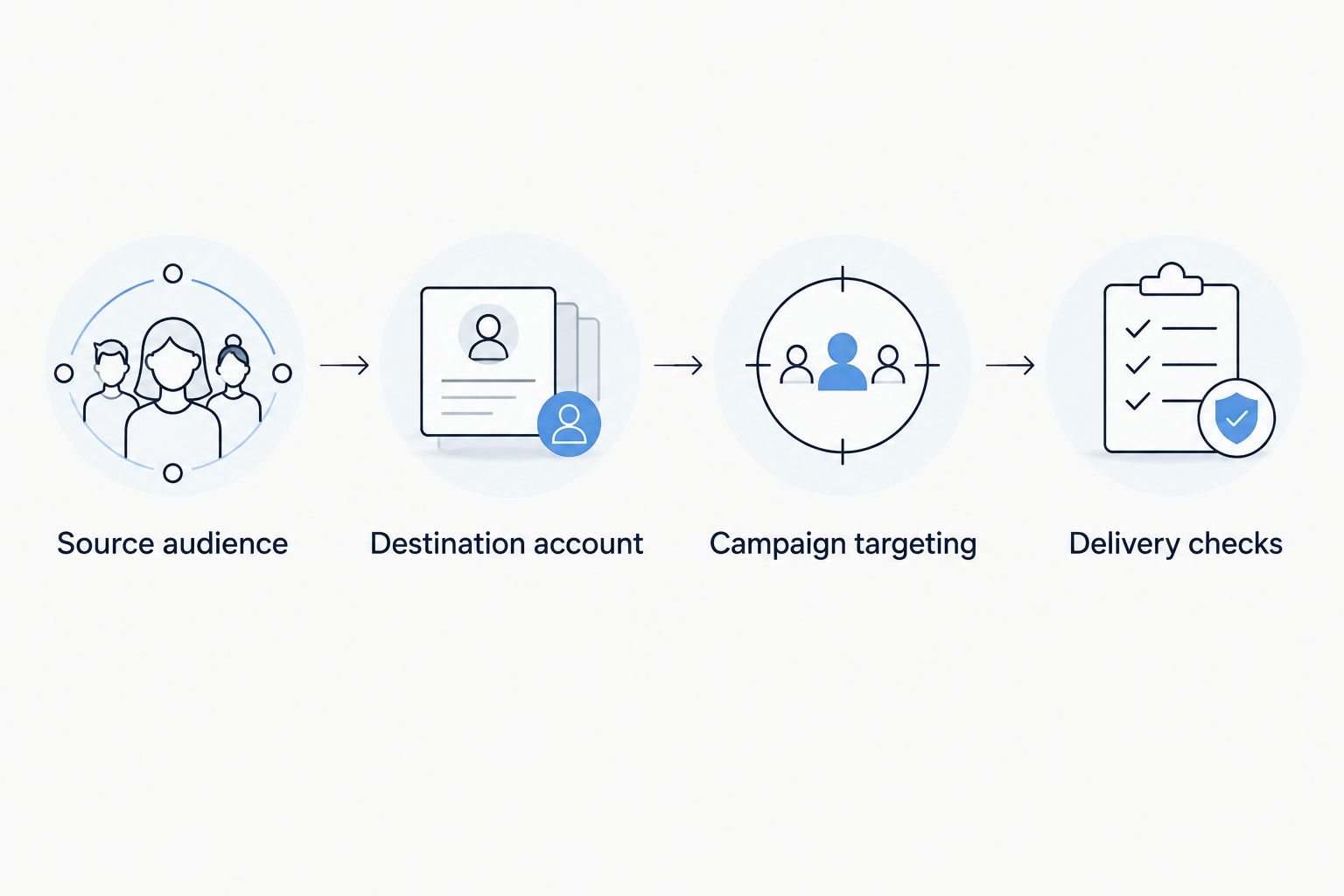
Verify each handoff; a completed transfer does not prove campaign eligibility.
Recurring activation follows the same distribution path but adds membership maintenance. Use it when customer eligibility changes and the connected source and destination support the required update behaviour.
A repeat upload is not automatically a correct refresh. Establish whether the configured route replaces membership, adds records or processes removals through a separate mechanism before scheduling it.
Controlled batch activation
Recurring audience refresh
To configure the recurring variant:
Expected result: Audience maintenance has a repeatable schedule, verified removal behaviour and a clear response when updates fail.
Neither workflow proves that an individual customer received or avoided an impression. Identity coverage, channel support and the destination's reporting determine what you can verify.
Check distribution status, the receiving advertiser identifier and account permissions before changing the source file. Confirm the destination's documented processing behaviour rather than repeatedly uploading the same audience. Escalate with the segment identifier, destination identifier and processing status, not raw customer data.
Inspect audience eligibility and campaign restrictions together. Geography, inventory, format and overlapping targeting conditions can leave no eligible impressions. Check whether the audience is supported on that channel before loosening unrelated controls; changing several settings at once destroys the diagnostic trail.
Separate uploaded records, accepted records, resolved identities and destination-addressable membership. These counts describe different populations and should not be treated as interchangeable. Review rejected records, identifier formatting and destination eligibility before labelling the difference a transfer failure.
Confirm the correct segment is attached as an exclusion at the intended campaign level. Then inspect membership updates, removal behaviour and identifier coverage. A suppression segment is not a universal do-not-advertise guarantee: it applies through the identifiers and controls supported by the configured buying path.
Connect the identity handoff to a broader campaign brief. For a brand bringing buying in-house, that means agreeing who owns the customer rules, creative approvals, publisher access and reporting definitions. For an independent agency, add explicit client-account separation and a repeatable approval record.
Cake.Shop's modular programmatic advertising stack covers media buying and reporting, rich media and DOOH creative, data clean rooms and publisher supply. Those components serve different purposes; do not assume one audience connection works identically across all of them. Confirm the integration boundary and channel requirements for each planned activation.
Separate identity targeting from creative and supply decisions. An addressable audience does not establish that a rich media asset is compatible with a placement, or that individual identity targeting applies to a DOOH campaign. Validate those requirements in their own configuration checks.
If your workflow includes controlled collaboration between data owners, use the data clean room for media agencies guide to define that separate workstream. A clean room is not a substitute for confirming the DSP distribution path.
For a Cake.Shop enquiry, bring the proposed destination, advertiser-account ownership, intended channels and required audience update behaviour. That makes the discussion about a defined buying workflow rather than an assumed connector.
How do I connect LiveRamp identity data to a DSP?
Confirm a supported destination, configure the authorised advertiser-account connection, distribute an approved audience and validate its targeting inside the DSP. Verify delivery separately; successful distribution does not establish campaign eligibility.
Does every DSP support every LiveRamp audience?
No. Confirm the specific destination route, advertiser account, identifier types, geography and channels before preparing activation. Platform-level support does not establish universal audience compatibility.
Does this guide confirm a native Cake.Shop LiveRamp integration?
No. Confirm the supported connection and intended activation workflow directly before committing to a deployment. Cake.Shop's modular platform scope does not itself establish a specific LiveRamp connector.
Can I use LiveRamp audiences to exclude existing customers?
Use an audience for suppression only where the destination supports that use. Apply the exclusion at the correct campaign level and verify membership maintenance; identity coverage limits what the exclusion can accomplish.
Why is my DSP audience smaller than my customer list?
Source records and destination-addressable audience membership measure different stages. Check accepted identifiers, resolution, destination eligibility and processing status before diagnosing a failed transfer.
Can customer audience updates run automatically?
Recurring updates require a source and distribution route that support the intended schedule and membership behaviour. Verify additions, removals and failure handling before relying on scheduled activation.
Does hashing customer email addresses remove privacy obligations?
No. Hashing does not automatically make identifiable customer data anonymous. Establish the applicable legal basis, permissions and data-handling requirements before onboarding or activating customer audiences.
Test removal, not just arrival. A connection that successfully adds customers but mishandles exclusions or removals is not ready for unattended use. Make a verified membership change part of your 2026 acceptance test, with an owner responsible for the result.
Build a dynamic creative stock level trigger with validated inventory, approved assets and verified activation. Follow setup, testing and fallback guidance.
Read more →Google Ad Manager publisher supply integration needs a verified route. Map inventory, validate creative delivery and reconcile publisher and buyer reporting.
Read more →Set up a LiveRamp DSP integration with destination checks, audience mapping, suppression tests and reporting controls before activating first-party campaigns.
Read more →Book a 30-minute demo and see exactly how Cake.Shop works — no sales pitch, just the platform.