
OPEN DAILY
OPEN
HONEST
TRUST
LET'S CHAT



The best self-serve DSP platforms in 2026 depend on your operating model: shortlist Cake.Shop for a modular advertising stack, StackAdapt for contextual campaign planning, The Trade Desk for independent omnichannel buying, Google Display & Video 360 for Google-connected workflows, and Amazon DSP for Amazon audience activation. This guide compares those five routes for independent agencies and brands bringing programmatic in-house, without pretending one platform fits every buyer.
TL;DR
A demand-side platform, or DSP, lets advertisers buy digital advertising inventory and control campaign targeting, bidding and delivery. Self-serve means your team operates the platform rather than handing every campaign decision to a managed-service provider.
That distinction does not settle the buying decision. You still need to establish who owns the account, which tasks require outside support, how creative reaches publishers and whether reporting answers your client's questions.
For a 2026 shortlist, separate buying access from operating independence. A platform that lets you change bids is not automatically a platform that gives your agency the reporting, permissions and contractual control it needs.
Judge the complete operating workflow, not the campaign dashboard alone. These six criteria determine whether a platform belongs on your shortlist:
A data clean room is a controlled environment for analysing or matching data under defined access rules. It is not a substitute for consent, sound measurement design or an agreed data-governance process.
Treat commercial terms as a separate assessment. Get written answers about platform charges, data charges, service responsibilities and contractual restrictions; a clean interface does not answer those questions.
The order below follows distinct buying briefs, not a measured performance ranking. Each platform owns a different shortlist position.
Cake.Shop
StackAdapt
The Trade Desk
Google Display & Video 360
Amazon DSP
Self-serve access conditions are part of the evaluation for every platform. Confirm the contracting route, account permissions and support model before designing a workflow around direct access.
Cake.Shop provides a modular programmatic advertising technology platform covering media buying and reporting, rich media and digital out-of-home creative, data clean rooms and publisher supply. The relevant buying question is how those parts fit your existing stack, not whether you need another isolated bidding screen.
Cake.Shop is a shortlist fit for independent agencies and brands evaluating a modular programmatic advertising stack. An agency can assess buying, creative and supply together; an in-house brand can use the same brief to identify which parts it wants to operate internally.
Pros:
Cons and trade-offs:
For a 2026 enquiry, bring a campaign brief and a diagram of your current systems. Ask the team to show where buying, creative, reporting and supply connect, and where your staff or another provider remains responsible.
Best for: Independent agencies building their own advertising stack and brands bringing programmatic in-house.
Verdict: Hold until the proposed module combination and operating responsibilities are demonstrated against your brief.
StackAdapt is a multichannel DSP with contextual advertising capabilities. Contextual targeting selects advertising opportunities using the content or environment around the placement rather than relying solely on a named audience segment.
That makes StackAdapt relevant when your planning brief starts with topics, content relevance and channel selection. For example, a brand can ask how a contextual strategy translates into targeting rules, exclusions and a report that explains where advertising appeared.
StackAdapt pros:
StackAdapt cons and trade-offs:
Ask for a practical demonstration of contextual setup. Use a category with obvious exclusions and check how the operator handles ambiguous content, placement review and reporting explanations.
Do not confuse targeting sophistication with ease of operation. Your own campaign manager should complete the workflow rather than watch a presenter move through prepared screens.
Best for: Teams whose programmatic brief prioritises contextual relevance and multichannel campaign planning.
Verdict: Hold until StackAdapt demonstrates your contextual targeting, exclusion and reporting requirements.
The Trade Desk is an independent DSP for buying advertising across channels, including display, video, connected TV and audio. Its shortlist position is a buying brief that needs multiple channel types within an independent demand-side platform.
For an agency serving different client media plans, that breadth is relevant. It also creates a practical requirement: your team must define how budgets, audience decisions and reporting work across those channels.
The Trade Desk pros:
The Trade Desk cons and trade-offs:
During a 2026 evaluation, make the presenter explain a cross-channel report without treating every impression as equivalent. Ask which comparisons your team can make directly and which require separate interpretation.
If your immediate requirement is narrow, keep the demonstration narrow too. A feature tour across channels you do not plan to use does not establish operational fit.
Best for: Agencies and in-house teams seeking independent buying across multiple advertising channels.
Verdict: Hold until The Trade Desk demonstrates your channel mix, reporting structure and intended access model.
Google Display & Video 360 is Google's DSP, with connections to other Google advertising and measurement products. It belongs on the shortlist when your existing workflow includes products such as Campaign Manager 360 and you want to assess those connections directly.
The relevant advantage is workflow fit, not a blanket claim about better campaign results. Start with the systems you already use, then examine which processes the proposed setup joins together.
Google Display & Video 360 pros:
Google Display & Video 360 cons and trade-offs:
Bring a real reporting specification. Ask the presenter to show the campaign setup, associated measurement workflow and export your client or finance team will receive.
Also establish the account relationship before onboarding. Your agency or brand needs a written answer about access, administration and continuity if a service partner changes.
Best for: Teams whose advertising operations already centre on Google's connected product stack.
Verdict: Hold until Google Display & Video 360 demonstrates the required connections and external reporting workflow.
Amazon DSP supports programmatic advertising using Amazon audience signals. It is relevant when your campaign brief explicitly calls for those signals rather than treating them as an incidental addition.
An advertiser selling through Amazon has a clear reason to examine the relationship between audience activation and its measurement requirements. An advertiser with a different sales model needs an equally clear explanation of what the campaign is intended to achieve.
Amazon DSP pros:
Amazon DSP cons and trade-offs:
Keep audience selection and outcome measurement separate in the demonstration. Ask what the audience represents, which campaign decisions you control and how the report relates to the conversion your business actually values.
Confirm self-serve access through the proposed contracting arrangement. Do not build an internal operating plan around an access model that has not been agreed.
Best for: Advertisers with an explicit requirement to activate Amazon audience signals.
Verdict: Hold until Amazon DSP demonstrates the audience use case, measurement approach and account access you need.
This 2026 shortlist uses operating fit: modular full-stack scope, contextual planning, independent omnichannel buying, Google-connected workflows and Amazon audience activation. It does not claim a tested performance winner or a universal budget option.
Platform descriptions establish shortlist relevance. The criteria above establish what you must validate before procurement: control, reporting, creative, supply, data governance and ownership.
Use the same demonstration brief for every shortlisted provider. Recommended test scope: 1 campaign brief, 3 placement examples and 2 reporting exports. Those are evaluation requirements, not claimed platform limits.
Follow this sequence:
The sequence exposes gaps that a prepared presentation hides. Record each requirement as demonstrated, not demonstrated or outside the proposed scope.
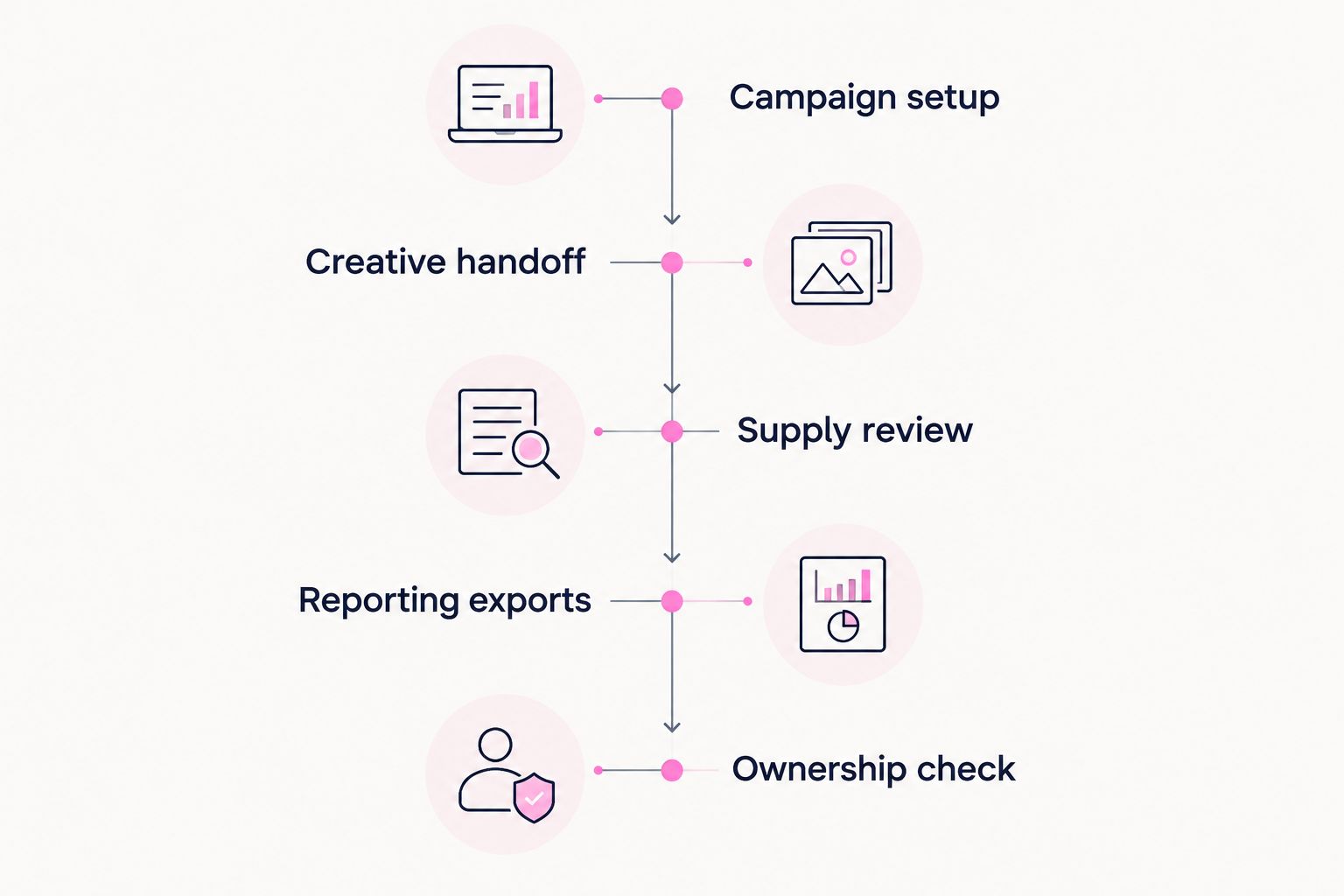
Evaluate the complete operating workflow, not just campaign setup.
Choose by the work your team must own. For a modular full-stack brief, start with Cake.Shop. For a context-led brief, start with StackAdapt; for independent omnichannel buying, start with The Trade Desk.
Google Display & Video 360 belongs first when Google-stack connections define the requirement. Amazon DSP belongs first when Amazon audience activation defines it. These are starting points for evaluation, not substitutes for a demonstration.
If you are undecided, write the operating brief before booking another platform presentation. List your required channels, creative formats, report fields and account responsibilities; then shortlist against that document.
Assess your modular advertising stack
Discuss media buying, reporting, rich media, DOOH creative, data clean rooms and publisher supply.
What's the best self-serve DSP for an independent agency?
The right self-serve DSP depends on the agency's operating brief. Cake.Shop fits a modular full-stack evaluation; StackAdapt fits contextual planning, and The Trade Desk fits independent omnichannel buying. Validate permissions, reporting and client account structures before choosing.
Is a self-serve DSP the same as a managed advertising service?
No. A self-serve DSP lets your team operate campaigns, while a managed service assigns campaign operations to a provider. Confirm the division of work because platform access and service support are separate questions.
Is StackAdapt better than The Trade Desk?
Neither platform is established as better by this comparison. StackAdapt is shortlisted for contextual planning, while The Trade Desk is shortlisted for independent omnichannel buying. Compare both against the same campaign and reporting requirements.
Should I choose Google Display & Video 360 if I already use Google tools?
Shortlist Google Display & Video 360 when connections to your existing Google advertising tools are a core requirement. Demonstrate those connections and the reporting exports you need; familiarity alone does not establish operational fit.
Do I need to sell on Amazon to evaluate Amazon DSP?
Selling on Amazon is not the only reason to evaluate Amazon DSP. The relevant question is whether Amazon audience signals serve your campaign objective and whether the measurement approach answers your business questions.
What should I ask about self-serve DSP costs?
Ask for a written breakdown of platform, data, media and service charges, together with the applicable contractual requirements. Compare the same campaign scope and operating responsibilities across providers rather than comparing isolated fee labels.
What should a DSP demonstration include in 2026?
A DSP demonstration should include campaign setup, creative handoff, supply review, reporting exports and ownership checks. Use your own brief and required report fields so the demonstration tests your workflow rather than the presenter's prepared example.
Ask the provider to demonstrate a correction, not just a launch. Change a creative requirement, remove an unsuitable placement and request a revised report during the same session.
That reveals where decisions sit and which tasks require another team. For your 2026 buying decision, a visible correction workflow is more useful than another feature slide.
Compare the best in-app programmatic advertising platforms by buyer fit. Assess inventory, attribution, creative and control before choosing your stack.
Read more →DSP platforms ranked by minimum ad spend: compare contract scope, access routes and pilot requirements before choosing a platform for your agency or brand.
Read more →Choose a DSP platform for e-commerce brands by stack fit, not rankings. Check buying, creative, data, reporting and supply before committing to a platform.
Read more →Book a 30-minute demo and see exactly how Cake.Shop works — no sales pitch, just the platform.