
OPEN DAILY
OPEN
HONEST
TRUST
LET'S CHAT


Yes, a DSP can buy CTV and DOOH from the same platform when it connects to supply sources for both channels. Shared buying does not mean shared creative specifications, identical impression measurement or automatic audience deduplication; check those separately before committing your budget.
TL;DR
Why this matters: For your 2026 media plan, the useful question is not whether a dashboard lists both channels. It is whether your team can access the required inventory, control delivery and explain the results without disguising differences between television viewing and public-screen exposure. Start with the buying criteria in this guide, then use the CTV advertising platforms guide to structure your shortlist.
Yes, provided the DSP supports the necessary CTV and DOOH supply connections. A demand-side platform, or DSP, lets advertisers buy advertising inventory programmatically. Its channel coverage depends on the exchanges, supply-side platforms and publisher arrangements connected to it.
Connected television, or CTV, means internet-connected television viewing. Digital out-of-home, or DOOH, means advertising on digital screens in public or commercial spaces. The buying interface can bring these channels together without making their delivery mechanics equivalent.
Inventory to verify
Creative to verify
Context to control
Measurement to inspect
Main limitation
For a 2026 platform evaluation, request evidence for the actual publishers and screen networks in your brief. A channel name in a presentation is not evidence that the inventory you need is connected.
A shared platform can reduce the need to move between separate buying systems. Whether it also consolidates planning, billing, reporting or permissions depends on the platform and your commercial arrangement. Treat each of those as a separate requirement.
For an independent agency, the practical goal is a campaign workflow that account teams can explain and traders can operate. For an in-house brand team, the goal is control over campaign decisions and access to the records behind them.
The distinction matters when you compare operating models:
Shared DSP
Separate specialist platforms
Choose the workflow that meets the brief, not the one with the fewest logins. Shared access has value only if the platform preserves the controls and evidence your team needs.
Use the same written brief throughout your 2026 evaluation. Ask each provider to demonstrate the campaign you intend to run, including the reporting handover, rather than a generic product tour.
Name the markets, streaming environments, venue categories and screen networks you need. Ask which connections support them and which require separate publisher agreements or deal setup. A deal is a buying arrangement with agreed terms; a deal identifier helps the buying system recognise that arrangement.
Request a sample inventory report. Check whether it shows enough detail to distinguish the environments you approved from a broad channel label.
Give the provider a representative CTV asset and a representative DOOH concept. Ask for the applicable specifications, approval process and rejection reasons before production begins. Accepted files and approval rules belong to the actual supply route, not just the DSP interface.
Do not assume that a television video can run unchanged on a public screen. Orientation, legibility, playback conditions and audio expectations need separate treatment.
Show how the campaign should divide delivery between channels, locations and schedules. Ask the provider to demonstrate which controls are available and where they apply. Record whether a setting governs the whole campaign, an individual channel or a particular supply source.
This prevents a common planning mistake: treating a campaign-level setting as proof that every underlying environment follows the same rule.
Request an export, not just a dashboard view. Check the definitions behind impressions, plays, completed views and any reach or outcome measures. Identify which fields come from the DSP and which come from supply or measurement partners.
Your agency or brand team should be able to explain the report without relying on an undocumented interpretation from the vendor.
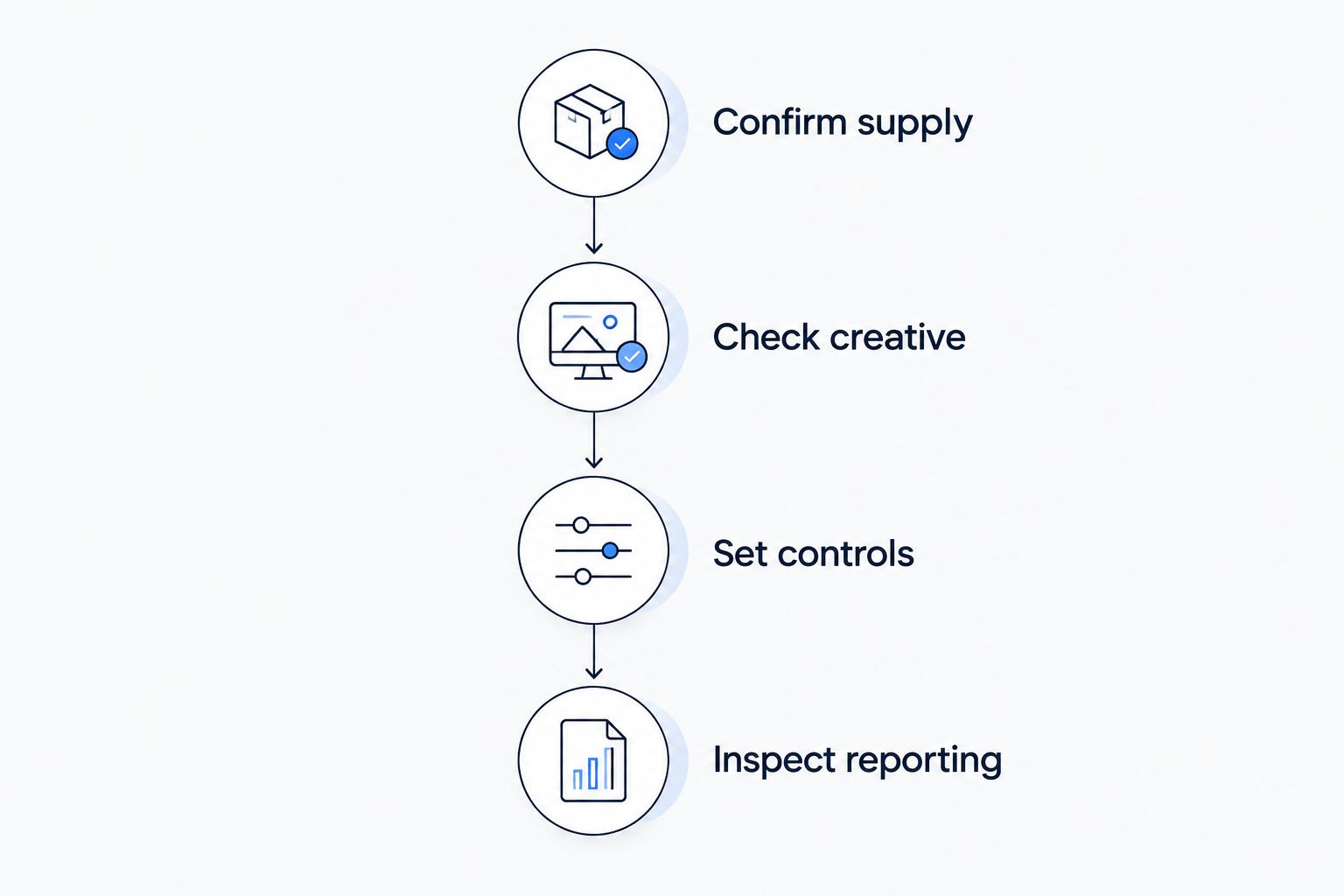
Validate the buying workflow before treating both channels as a single reporting system.
Channel support is a starting point, not a complete specification. These factors determine whether a combined workflow fits your campaign:
For your 2026 procurement decision, turn each factor into an acceptance test. Replace a question such as ‘Do you support DOOH?’ with ‘Show how this approved screen network appears in setup and in the delivery export.’
The same campaign idea can support CTV and DOOH, but the same creative file is not automatically suitable for both. Build a shared message, then produce assets for each viewing environment.
CTV creative needs to work as television video. DOOH creative needs to communicate on the selected screen in its actual setting. A message that relies on spoken explanation is unsuitable for a placement where you cannot depend on audible playback.
For a retail campaign, that means keeping the proposition consistent while changing the execution. The television version can develop a sequence; the public-screen version should communicate without requiring someone to watch the whole sequence. Confirm screen requirements before adapting the asset.
Approve the channel-specific execution, not just the master creative. A successful file upload only proves that a file was accepted, not that its message suits the environment.
A shared DSP does not automatically deduplicate reach across CTV and DOOH. Deduplication means estimating the distinct audience after accounting for overlap; it requires an appropriate methodology and supporting data.
CTV measurement can involve household or device signals. DOOH exposure estimates depend on the measurement approach used for the screen environment. Neither automatically establishes that the same person saw both ads.
Ask the provider what the reported reach represents, how overlap is estimated and which audiences remain outside the method. If it cannot explain those boundaries, report channel-level reach separately rather than presenting a combined figure as unique people.
A shared DSP does not make a person-level frequency cap work automatically across CTV and DOOH. A frequency cap limits exposure against a recognised identifier or another defined unit; a screen playback schedule is a different control.
For CTV, ask which identifier the cap uses and where it applies. For DOOH, ask how buying frequency, playback and audience exposure are defined. Do not describe scheduled screen delivery as a guarantee about how often an individual sees an ad.
This distinction belongs in the client brief. Otherwise, a technically valid campaign setting can become an unsupported audience promise.
Cake.Shop is relevant to independent agencies and in-house brands evaluating a modular programmatic advertising stack. Its stated scope includes media buying and reporting, rich media and DOOH creative, data clean rooms, and publisher supply. That makes the evaluation broader than a standalone buying interface.
The useful question is how those components would support your actual campaign. Buying needs approved creative; creative needs the correct destination specifications; reporting needs delivery records; audience analysis needs suitable data and governance. A data clean room provides a controlled environment for permitted data collaboration, not automatic permission to combine datasets or proof of cross-channel identity.
Cake.Shop should be assessed against that full workflow, with the required CTV supply routes confirmed explicitly. Its stated modular scope alone does not establish access to a particular streaming publisher, a specific screen network or a unified reach methodology.
Ask for a demonstration that follows your brief from supply selection through creative approval to reporting. The trade-off with a modular approach is that interfaces, responsibilities and data handoffs still need documenting. Modularity is useful when it gives your team control; it is not a substitute for clear operating ownership.
Before approving a combined CTV and DOOH platform in 2026, require a written record of the decisions below:
Keep the pilot brief narrow enough to inspect. A campaign that spans every possible channel is harder to diagnose when an approval, supply or reporting issue appears. First establish that the required workflow works; then expand the scope.
Can any DSP buy both CTV and DOOH?
No. A DSP needs supported supply connections for both CTV and DOOH, and those connections must cover the markets and inventory in your brief.
Is buying CTV and DOOH together better than using separate platforms?
Shared buying is useful when it meets your supply, control and reporting requirements. Separate platforms remain a valid choice when a required channel workflow or supply relationship is not supported by the combined option.
Can I move budget between CTV and DOOH in one platform?
Check budget controls and deal commitments before assuming you can move budget between channels. A shared interface does not establish that every buying arrangement permits the same changes.
Does one dashboard give me one cross-channel audience figure?
No. A shared dashboard can display channel results without deduplicating audiences, and any combined reach figure needs a stated methodology.
Do I need separate creative for CTV and DOOH?
You need creative approved for each channel's actual specifications and viewing conditions. A common campaign message does not mean the same file, orientation or audio treatment suits every placement.
Does a data clean room solve cross-channel measurement?
A data clean room does not solve cross-channel measurement on its own. The analysis still needs suitable datasets, permitted matching methods and a clearly defined measurement question.
What should I ask Cake.Shop about a CTV and DOOH campaign?
Ask Cake.Shop to confirm the required supply connections and demonstrate buying, creative handling and reporting against your brief. Treat cross-channel identity, reach deduplication and frequency control as separate requirements to verify.
Ask for a sample report before you approve the buying workflow. If the team cannot explain what each impression represents, it cannot responsibly combine the totals.
That check exposes more than a measurement problem. It tests whether sales, trading and reporting teams share the same definition of what you are buying.
Is retail media worth it for CPG brands? Test incremental profit, not just attributed sales. Compare formats, measurement limits and investment criteria.
Read more →How much does header bidding cost publishers? Costs vary by setup, fees and operating work. Compare retained revenue, service scope and deductions.
Read more →Can a DSP buy CTV and DOOH from the same platform? Yes, with the right supply integrations. Check creative, reporting and measurement before you commit.
Read more →Book a 30-minute demo and see exactly how Cake.Shop works — no sales pitch, just the platform.