
OPEN DAILY
OPEN
HONEST
TRUST
LET'S CHAT



Yes, rich media ads can run on mobile in-app inventory when the app’s advertising software supports the creative’s format, required features and delivery method. For a 2026 campaign, confirm the placement’s MRAID support, publisher specifications and measurement requirements before production; an HTML5 ad that works in a browser is not automatically ready for an app.
TL;DR
A successful browser preview is not an in-app approval. Your creative must work inside the publisher’s app, through its advertising software, under the rules attached to that placement.
For an independent agency or an in-house brand team, that changes the brief. Confirm the buying route before commissioning an expandable panel, interactive gallery or other experience that depends on app-level support. The guide to in-app programmatic advertising platforms covers the buying-platform side; this page focuses on the creative-to-inventory connection.
Keep delivery and measurement separate, too. An ad can display correctly while its engagement events fail to reach your reporting system. Approval needs to cover both.
Yes—but the placement must support the specific rich media behaviour you intend to use. MRAID, short for Mobile Rich Media Ad Interface Definitions, is the IAB Tech Lab standard that gives compatible creative a defined way to communicate with an app’s advertising environment.
That environment commonly includes an advertising software development kit, or SDK. The SDK handles advertising functions within the app; the creative uses supported interfaces rather than assuming it has the same access as a normal browser page.
IAB Tech Lab’s published MRAID specifications define this interface. MRAID 2.0 and MRAID 3.0 are distinct specification versions, so “supports MRAID” is an incomplete answer to a production brief. Ask which version and which required behaviours the actual placement supports.
HTML5 creative without app-specific interactions
MRAID-enabled HTML5 creative
Static fallback
These are implementation choices, not interchangeable labels. HTML5 describes the technologies used to build the creative. MRAID defines an interface between that creative and a compatible mobile advertising environment.
An HTML5 creative can contain animation, selectable content and other interactions without needing to expand outside its assigned space. That makes it a practical option when your message fits inside the placement and the publisher accepts the delivery format.
The trade-off is the container. An in-app webview—the component that displays web content within an app—does not guarantee the same behaviour as the browser used for your preview. Asset loading, destination opening and interaction handling all need testing.
Ask whether the publisher accepts a hosted tag, an uploaded creative package or another specified delivery method. Do not treat acceptance of HTML5 as acceptance of every tag or external dependency.
For a 2026 creative brief, name the intended interaction rather than writing only “rich media”. “Swipe between product messages within the ad” gives the publisher something concrete to approve. “Interactive ad” does not.
MRAID provides a standard interface; it does not grant unrestricted access to the device or override publisher rules. Support for the standard is the starting point, not the acceptance test.
If your creative needs to resize or expand, confirm that behaviour for the placement before designing around it. Also establish how users close the experience and return to the app. A feature supported by an SDK can still be unsuitable or disallowed in a particular placement.
Brief the behaviour, the permitted space and the exit together. An expansion that renders correctly but leaves an unclear close control is not an acceptable user experience.
Do not request a newer MRAID version simply because its number is higher. Identify the functions your creative requires, then verify those functions against the publisher’s implementation. The relevant question is whether the delivered experience works, not whether the proposal lists a particular specification.
Use this sequence for a 2026 launch. Each step produces a concrete approval item, so responsibility does not disappear between the creative team, buyer and publisher.
Record the app, operating system, placement type and buying route. Confirm whether the ad occupies a contained slot or a full-screen placement, and obtain the applicable creative specifications.
Do not approve a generic category such as “mobile inventory”. Mobile web and mobile in-app are different environments. A buying plan that groups them together still needs separate creative validation.
List what the ad actually does: animates, accepts taps, changes panels, plays video or requests a supported container action. Separate essential interactions from optional enhancements.
Then map those requirements to the publisher’s accepted format and interfaces. If an essential behaviour is unsupported, change the placement or the concept before production proceeds.
Confirm how the creative enters the campaign and reaches the app. Include the creative host, buying platform, supply partner and publisher wherever they form part of that route.
Ask who validates the tag and who handles rejection. A creative approved in one system still needs to satisfy the systems that actually deliver and render it.
Test loading, interaction, destination opening and closing in the supported app environment. Cover the operating systems, orientations and placement configurations included in your media plan.
Exercise failure conditions as well as the intended path. Check what happens when an asset fails to load, the connection slows or the user leaves the ad midway through an interaction.
Define the impression, click and engagement events you expect before launch. Confirm which system records each event and what the event means.
A swipe, an expansion and a destination click are different actions. Reporting them under one engagement label hides the behaviour you need to evaluate.
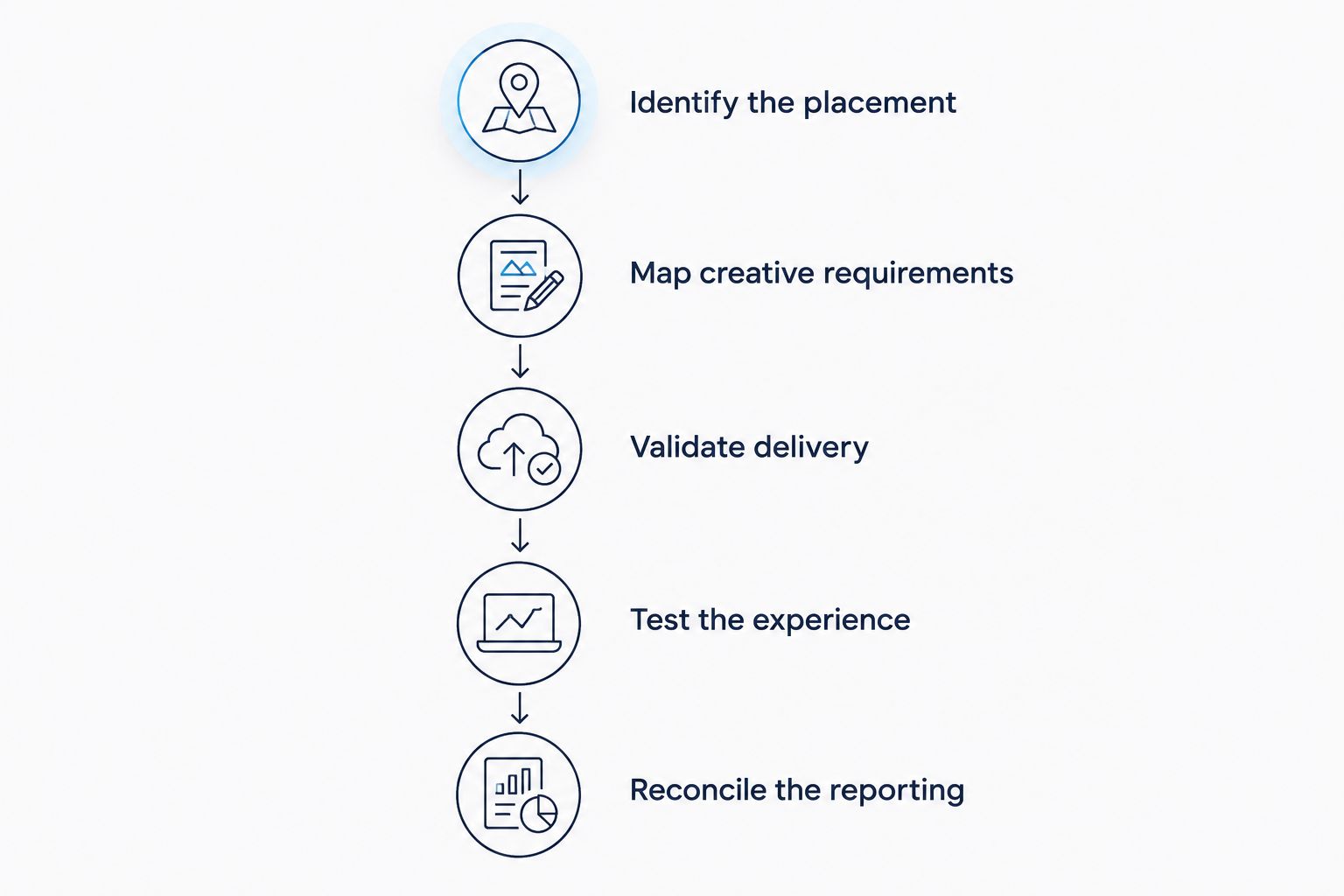
Approve the delivery environment before treating the creative as launch-ready.
Keep the resulting test record with the creative approval. It should identify the tested asset and environment, not merely state that a preview link worked. When either changes, assess which checks need repeating.
The label “in-app inventory” covers different technical implementations and publisher rules. For your 2026 campaign, resolve these factors before committing the creative concept:
The practical consequence is simple: approval belongs to a particular creative and delivery environment. It is not a permanent certificate that follows the asset across every app.
No. HTML5 is not an in-app compatibility guarantee. The publisher must accept the creative’s delivery format, and the app’s advertising environment must support its required behaviour.
Keep a browser preview as a design check. Use app-environment testing for delivery approval, including the destination link and the route back to the app.
No. MRAID support does not guarantee every feature or placement permission. Confirm the required functions, implementation and publisher rules rather than accepting a general compatibility statement.
For a 2026 approval, request evidence for the interaction you intend to ship. An expandable concept needs an expansion test, not just confirmation that a static opening frame renders.
Yes, when the creative and reporting setup capture the intended events. Define each interaction explicitly and confirm where it appears in reporting before using it as a campaign success measure.
A completed interaction is not automatically a conversion. Keep creative engagement, destination visits and business outcomes distinct so your optimisation decisions reflect what was actually measured.
For an independent agency or brand bringing programmatic in-house, rich media compatibility is not just a production task. The buying team needs access to suitable inventory, the creative team needs an accepted specification, and the reporting team needs agreed event definitions.
Cake.Shop provides a modular programmatic advertising platform spanning media buying and reporting, rich media and DOOH creative, data clean rooms and direct publisher supply. swweetshop is the platform that powers in-housing.
Cake.Shop is for independent agencies and brands building an in-house programmatic stack across buying, creative, data and publisher supply. That full-stack scope is relevant when your enquiry involves ownership and control across those functions, rather than creative production alone.
The trade-off is responsibility across the stack. A modular approach still requires you to agree who approves creative, validates supply and owns reporting definitions. Cake.Shop’s stated platform scope does not establish compatibility with a particular app SDK or placement; make that a specific technical question in your brief.
Include the intended app environments, buying route, creative behaviours and reporting requirements in the enquiry. That gives the discussion a concrete acceptance test instead of a generic request for “mobile rich media”.
Can rich media ads run on mobile in-app inventory?
Yes, rich media ads can run on mobile in-app inventory when the placement supports the creative’s format and required behaviours. Confirm delivery specifications, app-environment testing and measurement before launch.
Do all in-app rich media ads need MRAID?
No, not every in-app rich media execution requires MRAID-specific functions. Whether you need MRAID depends on the intended behaviour and the publisher’s accepted creative specification.
What is the difference between HTML5 and MRAID?
HTML5 describes web technologies used to build creative; MRAID defines an interface between compatible creative and a mobile app’s advertising environment. An HTML5 label alone does not establish MRAID support.
Can I reuse a mobile web creative inside an app?
You can reuse it only after validating the app placement’s requirements and testing the delivered experience. Do not assume that browser behaviour, click handling or measurement will transfer unchanged.
Should I choose a banner or a full-screen placement?
Choose the placement that supports your message and intended interaction under the publisher’s rules. A contained banner limits available space; a full-screen placement needs an experience designed for that context and its closing controls.
Does an ad rendering correctly mean its measurement works?
No, correct rendering does not prove that impression, visibility or engagement measurement works. Validate each required event and confirm which reporting system records it.
What should I ask Cake.Shop about an in-app rich media campaign?
Ask Cake.Shop to address the intended creative behaviours, inventory requirements, delivery route and reporting definitions together. Request confirmation for your specific app environment rather than assuming platform-wide compatibility.
Make the exit path part of creative approval. Teams naturally inspect the opening frame and main interaction; the destination hand-off, close behaviour and return to the app deserve the same attention.
Before signing off, ask the tester to complete the experience without guidance. Record what opens, what closes and which events appear in reporting. That checks the campaign you intend to buy—not just the animation you intended to build.
Can rich media ads run on mobile in-app inventory? Yes, with compatible placements. Check MRAID, creative delivery, testing and measurement first.
Read more →Ad verification and brand safety software cost depends on scope. Compare billing rules, coverage and commitments before approving your next quote.
Read more →Is in-app programmatic advertising worth it? Test business outcomes before scaling. Check app inventory, measurement and buying controls with this guide.
Read more →Book a 30-minute demo and see exactly how Cake.Shop works — no sales pitch, just the platform.