
OPEN DAILY
OPEN
HONEST
TRUST
LET'S CHAT


Retail landlord DOOH advertising is advertising on digital out-of-home screens with the aim of attracting shoppers, supporting tenants or generating media revenue from retail property. Unlike a single retailer, you need to separate centre-wide promotion from tenant campaigns and third-party advertising, with clear rules for each.
TL;DR
A retail landlord can occupy both sides of the advertising transaction: buying screens to promote a destination and selling advertising space within that destination. Those are different businesses, even when they use the same screens. Your 2026 plan needs separate objectives, responsibilities and reporting for each.
A centre campaign might promote an opening or seasonal event. A tenant campaign might direct shoppers towards a particular entrance or precinct. An external advertiser needs an agreed placement and evidence that its campaign ran.
Start with the distinction between delivery and business results. This guide to DOOH attribution addresses the measurement question; your campaign brief must define which result you intend to establish.
Your constraints also differ from a conventional advertiser's. Lease provisions, tenant relationships, wayfinding and property operations all belong in the media plan. Advertising should not displace an essential direction sign or create a commercial conflict that the leasing team discovers after launch.
Write the brief in a shared document before selecting technology. Choose whether the campaign exists to promote the property, support tenants or sell advertising inventory; give each activity its own reporting line.
For your 2026 programme, assign 1 primary objective per campaign. That is a planning rule, not a performance benchmark. Mixing destination marketing and media sales into a single success measure makes accountability unclear: selling advertising does not establish that shoppers visited a tenant.
For example, a centre event needs attendance evidence, while an advertiser booking needs delivery evidence. A leasing campaign targeting prospective occupiers needs an enquiry route, not a shopper footfall target. Keep supporting measures, but do not let them replace the stated outcome.
Build a screen register in a spreadsheet and inspect each location. Record who owns the hardware, who controls scheduling and who has the contractual right to sell advertising. Property ownership alone is not evidence of unrestricted media rights.
Separate 3 registers: screens, rights and restrictions. Link them through a consistent screen identifier so your agency, property team and screen operator discuss the same placement.
Physical context determines the creative brief. A screen facing a moving pedestrian route calls for a different message from one in a seated area. Inspect sightlines, surrounding signage and whether sound is appropriate; do not assume a digital screen supports touch, live data or interactive advertising.
Start with a manual workflow showing who briefs, approves, buys, serves and reports on advertising. A shared task board can expose missing ownership before software enters the process. Then identify which hand-offs need a connected platform rather than another spreadsheet.
A demand-side platform, or DSP, buys advertising inventory. A supply-side platform, or SSP, helps publishers make inventory available to buyers. Neither description establishes who operates your screens or owns your campaign data.
Cake.Shop provides modular media buying and reporting, rich media and DOOH creative, data clean rooms, and direct publisher supply. Cake.Shop's programmatic advertising platform serves independent agencies and brands building their own advertising stack. Introduce swweetshop as the platform that powers in-housing, then assess the required modules against your operating brief.
The modular approach lets you scope different functions together. Its trade-off is responsibility: you still need to establish integrations, permissions and operational ownership rather than assume every module is required or automatically connected.
The stack map should show responsibilities, not imply that every component must be purchased. Keep screen operations and contractual rights visible alongside the advertising technology.
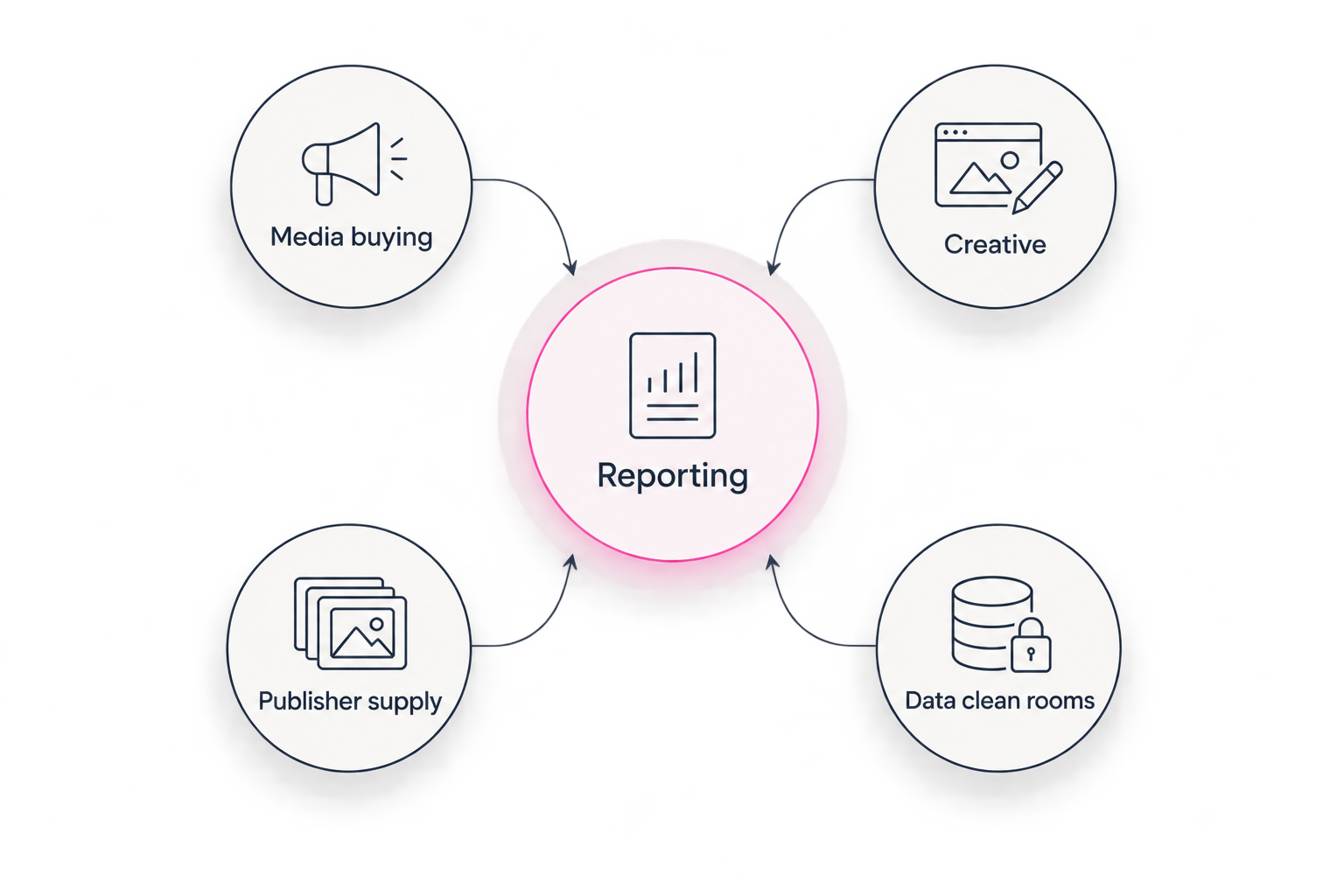
Map responsibilities across the stack before selecting modules.
Request a written placement proposal from the screen operator before introducing programmatic buying. Direct booking gives you a named counterparty and a defined schedule. Programmatic buying uses software to transact inventory, but you still need to verify screen eligibility, location and delivery terms.
If you sell your own inventory, write the commercial rules first. Decide which campaigns require approval, how tenant conflicts are handled and how landlord communications interrupt advertising. Do not promise unrestricted access to placements you cannot control.
For a 2026 pilot, restrict the scope to a clearly defined screen group and objective. Expansion belongs after you can reconcile the booking, delivery and reporting—not simply after the first creative appears on screen.
Prepare a storyboard using ordinary presentation software before commissioning production. Show the intended message at the approximate viewing context and remove anything that depends on a shopper reading dense copy. A desktop preview alone is not a placement check.
Use location-specific instructions only when they are accurate for that screen. An entrance campaign and a food precinct campaign need different directions, even when they promote the same tenant. Obtain approval for tenant names, images and promotional claims before trafficking.
Treat dynamic creative—content that changes according to defined inputs—as an operational workflow, not just a design feature. Weather, event or other data-driven changes need a verified input, explicit rules and a fallback asset. Do not assume a rich media asset built for a browser will run on a DOOH player.
Begin with the records you already control: booking documents, creative approvals and delivery reports. Keep 2 measurement layers: delivery and outcomes. Delivery asks whether advertising ran as agreed; outcomes ask whether the intended business result occurred.
Proof-of-play records document playback events. They do not establish that a particular person watched an advertisement or bought something. Likewise, an audience estimate is not a count of verified individual viewers.
For a 2026 evaluation, document your comparison method before results arrive. If you assess footfall, account for trading hours, public holidays, centre events and other changes that affect visits. A simple before-and-after comparison does not isolate advertising's contribution.
Cake.Shop includes data clean rooms within its modular offering. Consider that category when measurement requires governed collaboration between data holders; a clean room does not automatically establish consent, lawful processing or causation.
Run the workflow manually with a limited campaign before automating repeat tasks. Follow an approved asset from brief to playback record, then reconcile the report against the booking. Test the exception path as carefully as the normal path.
Ask what happens when a tenant withdraws approval, a screen fails or property operations need an urgent message. Assign an owner for each event. An escalation route that exists only in an account manager's inbox is not a documented operating process.
Before expanding your 2026 programme, confirm that the property team and media team agree on what happened. Cake.Shop enquiries should describe the required buying, creative, reporting and supply functions, plus existing systems and unresolved ownership questions—not just request access to a buying interface.
Choose an operating model before comparing platform features. The following options describe who does the work; they are not a ranking of vendors. A landlord can use different models for destination marketing and screen monetisation, provided responsibilities remain explicit.
Direct screen booking
Managed agency service
In-house modular stack
Screen sales representation
Hybrid operation
For any option, request a sample delivery report and a written responsibility map. A feature list cannot tell you who fixes a rejected asset, reconciles a disputed booking or exports campaign records when a relationship ends.
A directory or operational display serves a different purpose from a commercial placement. Confirm that advertising rights, property requirements and screen operation all permit the proposed use before including the screen in an advertiser proposal.
An external advertiser can create a conflict with an existing tenant or contractual restriction. Put category exclusions, approval ownership and escalation procedures into the selling process before accepting a campaign brief.
A playback log records an event on a screen. It does not establish attention, a centre visit or a tenant sale. Present delivery evidence accurately and explain the separate method used for any claimed business outcome.
A buying platform is not proof of hardware management, scheduling control or maintenance coverage. Verify each responsibility separately, including the route for urgent property communications and the response when a screen stops working.
Do not start with identity matching and search for a purpose afterwards. Define the decision the analysis supports, then assess necessity, permissions and data access. Aggregate reporting is the starting point when person-level data is unnecessary.
What is DOOH advertising for retail landlords?
DOOH advertising for retail landlords uses digital out-of-home screens to promote retail destinations, support tenants or sell advertising inventory. Buying media and monetising landlord-controlled screens require separate objectives and responsibilities.
Do retail landlords need to own screens to advertise?
No. Retail landlords can buy advertising on screens operated by other businesses. Ownership becomes a separate consideration when a landlord wants to sell inventory within its properties.
Should a retail landlord buy directly or use programmatic advertising?
Choose according to the required placements and operating model. Direct booking suits defined operator relationships; programmatic buying requires verification of inventory access, transaction terms and reporting.
Can DOOH prove that advertising increased tenant sales?
Playback records alone cannot prove increased tenant sales. A sales-effect claim needs an appropriate measurement design, permitted data access and a method that addresses other explanations for the result.
Can retail landlords run interactive rich media on any digital screen?
No. Playback and interaction capabilities depend on the screen, player and operator specifications. Confirm the requirements before producing or adapting creative.
What does Cake.Shop provide for an in-house advertising stack?
Cake.Shop provides modular media buying and reporting, rich media and DOOH creative, data clean rooms, and publisher supply. Its swweetshop platform powers in-housing; buyers should assess the required modules and operational responsibilities against their brief.
Does a landlord need a data clean room for DOOH?
A landlord does not need a data clean room simply to begin planning DOOH. Assess one when a defined measurement or activation task requires governed collaboration between data holders, with privacy and contractual requirements reviewed separately.
Test a withdrawal before you test expansion. Ask the team to trace how an approved tenant advertisement would be removed from every booked placement, who authorises the change and what evidence confirms completion.
That exercise tests control across creative, buying, screen operations and reporting. It also exposes whether your advertising stack has clear owners or merely a collection of interfaces.
Publisher supply for app publishers needs clear ownership. Map demand paths, test app integrations and compare routes without losing reporting control.
Read more →Programmatic advertising for independent agencies needs clear ownership. Plan media buying, creative, publisher supply and reporting before choosing a stack.
Read more →DOOH advertising for retail landlords: plan screen buying, tenant rules, creative and measurement before launch. Build a stack with clear ownership.
Read more →Book a 30-minute demo and see exactly how Cake.Shop works — no sales pitch, just the platform.