
OPEN DAILY
OPEN
HONEST
TRUST
LET'S CHAT


Publisher supply for app publishers is the inventory, seller relationships and technical connections used to sell in-app advertising, with the aim of earning revenue while protecting the app experience. Unlike website inventory, app supply depends on app identity, software development kit behaviour, operating-system permissions and placement rules that buyers can verify.
TL;DR
Your saleable product is a defined advertising opportunity, not simply an app audience. A buyer needs to understand where an impression appears, which formats it accepts and who is authorised to sell it. Your commercial team needs to explain the same opportunity without promising data or measurement your implementation cannot provide.
In 2026, build your supply strategy around those requirements before adding partners. A supply-side platform for publishers provides technology for selling inventory, but it does not replace your responsibility for placement design, permissions or reconciliation.
For independent agencies and in-house brand teams buying app inventory, these details determine whether a publisher relationship is operationally usable. For publishers, they determine whether an enquiry becomes a deal that can actually deliver.
Start with a spreadsheet. Record each placement, its location in the user journey, supported formats and the conditions under which it requests an ad. Separate rewarded video from interstitial and banner placements; their user experience and acceptance criteria differ.
Give each placement a stable identifier that appears in both commercial documentation and reporting. Describe any reward explicitly, including what happens when playback fails. A placement that looks attractive in a presentation still needs predictable behaviour in the app.
Organise the inventory map around four connected requirements: App identity, Placement rules, Buyer access and Reporting. This makes the hand-off between engineering, ad operations and sales explicit.
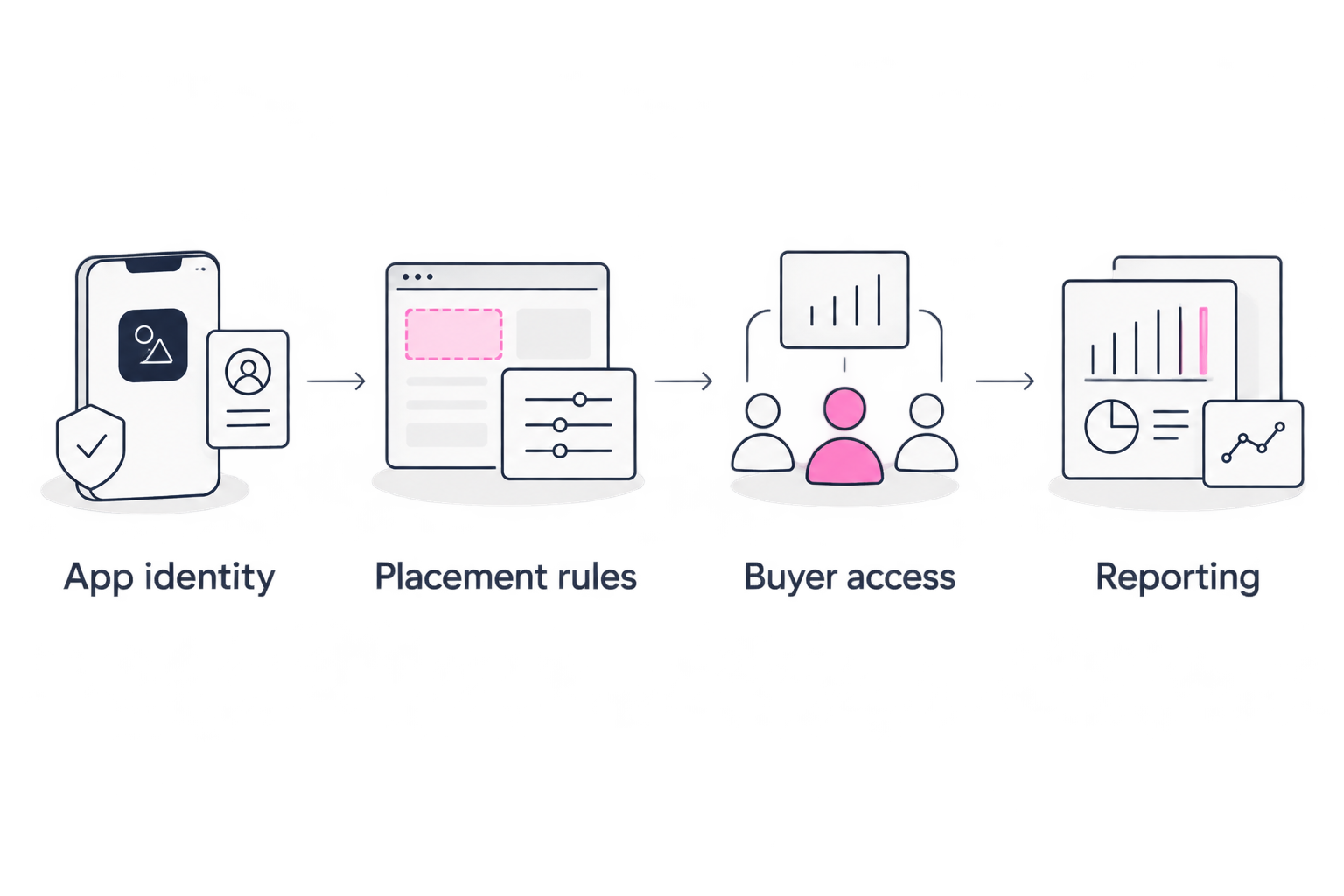
Define the inventory before deciding how buyers will access it.
Use a manual audit before changing integrations. Compare your partner contracts, seller records and app configuration, then ask each partner to explain any mismatch. Keep ownership of that register inside your business.
IAB Tech Lab's app-ads.txt standard lets app publishers declare authorised sellers through a file hosted on their developer website. Sellers.json and the OpenRTB SupplyChain object address seller identity and the intermediaries involved in a bid request. These mechanisms support supply-chain transparency; they do not certify an app's content or guarantee valid traffic.
Keep the 2026 authorisation review separate from your privacy review. An authorised seller is not automatically entitled to every identifier or audience attribute your app collects. Operating-system permission requirements and applicable privacy obligations still need their own checks.
Draw your current architecture before requesting a platform demonstration. Separate inventory access from media buying, creative production, data collaboration and reporting. Mark the owner of each function and the evidence needed to confirm that a connection works.
Cake.Shop provides modular media buying and reporting, rich media and DOOH creative, data clean rooms, and direct publisher supply. Its swweetshop platform powers in-housing. Cake.Shop is for brands and independent agencies building a modular programmatic stack. That positioning matters when your app supply needs to fit a buyer's wider operation rather than sit in an isolated selling interface.
The Cake.Shop full-stack approach brings those functions into the platform discussion. It does not make them interchangeable: DOOH creative concerns digital out-of-home screens, while app inventory has its own rendering requirements. A data clean room supports controlled data collaboration; it is not an app ad renderer or a substitute for permission checks.
For a 2026 evaluation, ask for an app-specific demonstration against your inventory map. Treat integration coverage, reporting fields and operational responsibilities as acceptance requirements, not assumptions.
Begin with your existing test build and a written test matrix. Engineering and ad operations should observe the same placement behaviour before commercial teams offer it to buyers. A successful bid is not proof that the ad displayed correctly.
For interactive creative, check the relevant runtime requirements. MRAID, the Mobile Rich Media Ad Interface Definitions standard, defines an interface between rich media ads and supporting mobile app environments. Compatibility still depends on the creative and the implementation; a format label alone is insufficient.
Test 1 placement first, then expand after the results meet your documented criteria. Where your app supports both iOS and Android, cover those 2 operating systems separately. These are proposed test boundaries, not claims about a platform's performance.
Include foregrounding, backgrounding and interrupted connectivity. A user who closes an ad should return to the expected app state, and a rewarded placement needs an explicit failure path.
Export your current reports and compare them in a spreadsheet before automating the process. Align time zones, currencies, placement identifiers and event definitions. Otherwise, two accurate reports can describe different populations of activity.
Judge a supply route on reconciled publisher revenue and delivery quality, not headline CPM alone. CPM means cost per thousand impressions; an advertiser's buying CPM is not automatically the publisher's net return. A route that produces an attractive rate still needs acceptable fill, payment terms and operational effort.
For your 2026 reporting specification, define the denominator for every rate. Fill rate based on eligible requests is not the same calculation as fill rate based on all app ad requests. State which events your report counts rather than treating similarly named columns as equivalent.
Use a proposed 7-day reconciliation window for the initial operational check. Extend the review when the test does not cover the app's normal usage patterns or the intended campaign conditions.
Write the first sales specification yourself. Describe the app context, placements, permitted creative, geographic coverage and reporting deliverables using information your team can substantiate. Keep observed audience characteristics separate from targeting capabilities.
Give independent agencies and in-house brand teams enough detail to determine whether the inventory fits their campaign. A private marketplace deal, or PMP, provides a restricted programmatic transaction route under agreed terms; it does not by itself promise delivery volume or campaign results. State those commitments separately when they exist.
Keep impression-based advertising separate from performance partnerships. When briefing affiliate marketing agencies for publishers, distinguish the attributed action that earns commission from an impression-based advertising event. Combining those models in a single revenue report without identifying the payment trigger hides what each channel actually contributed.
Commercial enquiries should end with a testable next step: an agreed placement, creative specification, buying route and reporting scope. More presentation slides will not fix an undefined delivery contract.
There is no universal route for every app. Use the table to assign responsibilities first, then evaluate the specific implementation. Pricing is excluded because commercial terms require a current proposal.
Direct advertiser agreements
Supply-side platform
Mediation with in-app bidding
Private marketplace deals
Cake.Shop modular full stack
Choose the route your team can operate and verify. Direct agreements and programmatic access can coexist, but document allocation rules so that one commitment does not silently consume inventory promised elsewhere.
More connections do not repair ambiguous inventory. If the same placement identifier covers different formats or app contexts, buyers and publishers cannot reliably interpret the results. Split materially different opportunities before expanding demand.
A software development kit, or SDK, gives the app access to a partner's software functions. Installation is only part of acceptance. Rendering, permissions, reporting and failure behaviour still need testing in the app.
An interactive creative file that works in one environment is not proof of compatibility with your placement. Require the actual creative, or a representative test asset, to pass the documented app checks before accepting the campaign.
Possessing first-party data does not establish permission for every advertising use. Define the purpose, permitted fields and receiving parties before promising activation or measurement. Keep those checks separate from the commercial appeal of the audience.
Fewer partners simplify the relationship map, but partner count is not a transparency measure. Preserve access to the seller identities, placement-level reports and contractual definitions needed to investigate delivery and revenue.
What does publisher supply for app publishers mean?
Publisher supply for app publishers means the app inventory, seller relationships and technical connections used to sell advertising. It includes placement definitions, buyer access, seller authorisation and reporting responsibilities.
Do I need an SSP to sell advertising in my app?
You do not need an SSP for every app advertising arrangement. Direct advertiser agreements are another route, while an SSP provides technology for selling inventory programmatically.
Is app mediation the same as a supply-side platform?
App mediation and a supply-side platform serve different roles. Mediation coordinates delivery across demand sources, while an SSP provides technology for offering inventory to programmatic buyers; a particular setup can involve both.
Does app-ads.txt stop all fraudulent app inventory?
App-ads.txt does not stop all fraudulent app inventory. It declares authorised sellers, so it belongs alongside seller verification, traffic-quality checks and app-level monitoring rather than replacing them.
Where does Cake.Shop fit into an app supply evaluation?
Cake.Shop fits the wider programmatic stack evaluation for brands and independent agencies. Its modules cover media buying and reporting, rich media and DOOH creative, data clean rooms, and publisher supply; validate app-specific requirements against the proposed implementation.
Can I sell in-app advertising without a device advertising identifier?
An advertising opportunity does not inherently require a device advertising identifier. Contextual buying routes exist, but you must verify each partner's integration requirements and follow applicable permission and privacy rules.
What should I measure before adding another demand partner?
Measure reconciled revenue, delivery quality and operational effort before adding another demand partner. Compare consistent placement populations and investigate rendering failures, deductions and reporting discrepancies rather than relying on headline CPM.
Run a withdrawal test before signing off your 2026 supply design: ask what happens if you remove a partner, stop sharing an identifier or reject a creative format. Document the operational consequences and your contractual rights.
Control means knowing what happens when you say no. Apply that test to a Cake.Shop proposal and to every other supply relationship you consider.
Publisher supply for app publishers needs clear ownership. Map demand paths, test app integrations and compare routes without losing reporting control.
Read more →Programmatic advertising for independent agencies needs clear ownership. Plan media buying, creative, publisher supply and reporting before choosing a stack.
Read more →DOOH advertising for retail landlords: plan screen buying, tenant rules, creative and measurement before launch. Build a stack with clear ownership.
Read more →Book a 30-minute demo and see exactly how Cake.Shop works — no sales pitch, just the platform.