
OPEN DAILY
OPEN
HONEST
TRUST
LET'S CHAT


Instead of manually exporting loyalty lists for each campaign, build a first-party loyalty data to cookieless targeting workflow that checks permissions, creates eligible audiences, activates an approved buying route and feeds results back into reporting. This 2026 guide explains the configuration, validation and removal rules you need before customer records become advertising audiences.
TL;DR
A loyalty account identifies a customer inside your business. It does not automatically make that customer addressable across publisher inventory, or establish permission to use their details for advertising.
Cookieless describes the absence of third-party cookies, not the absence of identifiers or privacy obligations. Separate what you know about customers from what you can lawfully activate and measure.
Cake.Shop provides modular programmatic technology spanning media buying, rich media creative, data clean rooms and publisher supply. For this workflow, evaluate those components together: audience eligibility, creative suitability, inventory access and reporting must support the same campaign objective. A clean room alone does not complete that chain.
Treat the steps below as a platform-neutral configuration specification. Use the actual controls documented by your selected systems; the bold terms describe configuration concepts, not assumed interface labels.
Expected result: You can explain why a customer qualifies, where their identifier came from and which fields leave your environment.
Do not export the whole loyalty table because the destination accepts a file. Data minimisation makes the workflow easier to inspect and limits unnecessary disclosure. It also prevents an unrelated customer attribute from silently becoming an advertising rule.
Expected result: The same source state produces the same eligible audience, and exclusions take precedence over inclusion.
For a 2026 implementation, record the rule version alongside each audience run. A segment name such as “recent customers” is not enough to explain a later change in delivery.
Cookieless targeting has distinct routes. Choose according to the campaign objective and the permissions attached to the data, not a promise that one method replaces every cookie-based use case.
Identity-based activation
Contextual targeting
Aggregate clean-room analysis
Do not confuse aggregate analysis with an exportable audience. A clean-room query can produce a useful report while producing no identifiers that a buying platform can accept.
Loyalty data can inform contextual planning through permitted aggregate insights, such as category preferences. That is different from targeting the customers who generated those insights. Keep the distinction visible in campaign names and reporting.
Expected result: The receiving system recognises the intended output, and you can trace it back to a permitted source audience.
Use the data clean room guide for media agencies to frame access, collaboration and output requirements before choosing an implementation.
The operating sequence should remain visible to everyone responsible for the campaign: Eligibility, Matching, Activation, Measurement and Removal. Removal belongs in the design, not in a later support ticket.
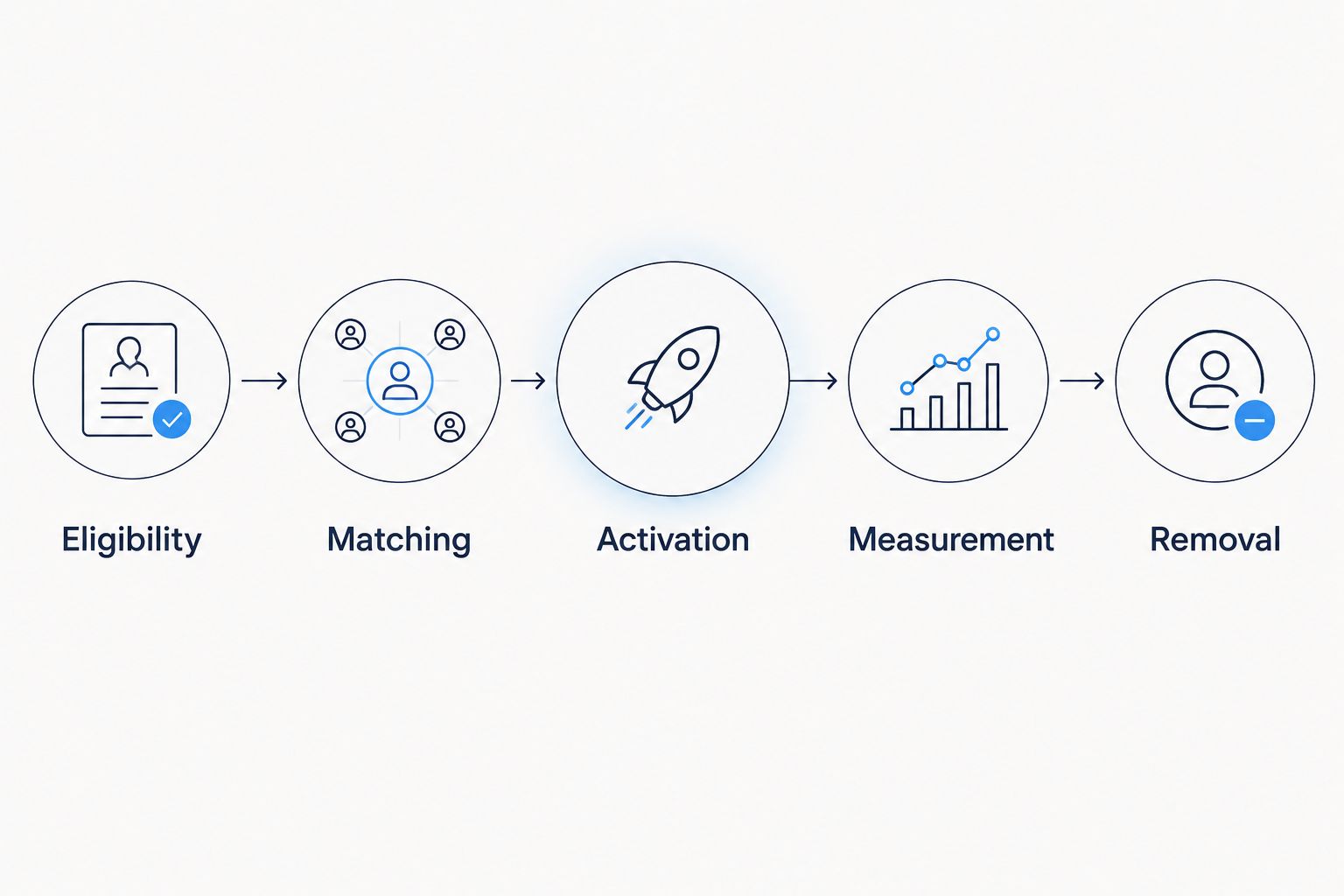
Define removal alongside activation so audience changes have a documented downstream path.
Expected result: The campaign uses the intended audience for the intended purpose, with suitable creative and supported inventory.
Cake.Shop is a modular programmatic platform for independent agencies and brands bringing advertising in-house. Its stated scope includes media buying and reporting, rich media and DOOH creative, data clean rooms and publisher supply. That scope supports a full-stack evaluation, but it does not establish that a particular loyalty connector or activation method is available in your account.
Confirm the required integration before procurement. The trade-off with a modular stack is that you must define responsibility across the connected components rather than treating the buying interface as the whole workflow.
DOOH means digital out-of-home advertising. Keep DOOH planning separate from person-level loyalty matching unless your documented implementation supports the proposed connection and its permitted use.
Expected result: Reporting shows where records become addressable, where delivery occurs and what the measurement method can actually establish.
For your 2026 reporting plan, retain the audience rule version and campaign configuration alongside results. Otherwise, changes in eligibility can be mistaken for changes in media performance.
A second workflow handles changed records rather than rebuilding campaign decisions manually. Use event-driven updates only where the source and destination support them; otherwise, schedule a reconciled batch refresh.
Expected result: Changes to customer eligibility produce corresponding changes at the destination, with exceptions visible to an owner.
A 24-hour review interval can be an example operational checkpoint for a pilot, not a claim about platform processing speed or a legal withdrawal deadline. Set the actual schedule around applicable requirements and documented system behaviour.
Start with a clearly defined business use case and a reversible pilot. Expand only after the initial configuration handles exclusions, reporting and removal correctly.
For an agency, document advertiser-level separation and ownership of source data, audience definitions and reporting outputs. For an in-house brand, specify which team approves data use and which team resolves delivery failures.
When discussing Cake.Shop for a 2026 implementation, bring the source-system specification, permitted identifier types, intended channels and measurement requirements. Ask for confirmation of the complete path from data preparation to publisher supply, including where another integration or operating process is required.
Can I use loyalty data for targeting without third-party cookies?
Yes, where an approved identity-based activation route supports the data and its permitted use. Alternatively, permitted aggregate loyalty insights can inform contextual planning without matching individual customers.
Does hashing customer email addresses make them anonymous?
No. Hashed email addresses can still be used for matching and must not be treated as anonymous simply because the original text is hidden.
Do I need a data clean room for every loyalty campaign?
No. A clean room is relevant when the workflow requires governed collaboration or analysis; contextual planning does not inherently require one. Choose the route before choosing the infrastructure.
Can Cake.Shop connect my loyalty platform automatically?
Confirm the specific integration with Cake.Shop before implementation. Its stated platform scope includes data clean rooms and media buying, but that does not establish support for every loyalty system or connector.
What is the difference between matched reach and incremental sales?
Matched reach concerns addressability through an identity arrangement; incremental sales concern purchases caused by advertising beyond what would otherwise occur. Matching alone does not establish incrementality.
How often should I refresh a loyalty audience?
Set the refresh schedule around eligibility changes, withdrawal requirements and documented destination processing. Verify additions and removals rather than assuming a successful upload updates every customer correctly.
Can I use the same customer audience across every advertising channel?
Do not assume cross-channel compatibility. Identifier support, publisher participation, permissions and activation methods differ, so validate each intended channel separately.
Test removal before increasing reach. Add an authorised test record, confirm its eligible destination state, withdraw its permission and verify the required downstream removal. A workflow that activates correctly but cannot demonstrate removal is not ready to expand.
Keep that test in the operating checklist throughout 2026. It checks the whole chain, not just whether a file moved successfully.
First party loyalty data cookieless targeting starts with permission. Build an auditable workflow for audience matching, activation, reporting and removal.
Read more →Is a DSP platform worth it for a small agency? Yes, when recurring work justifies control. Compare operating models, staffing needs and reporting checks.
Read more →How much does a DSP platform cost? Compare the full scope: media, technology, data, creative and operations. Know what to ask before signing a contract.
Read more →Book a 30-minute demo and see exactly how Cake.Shop works — no sales pitch, just the platform.