
OPEN DAILY
OPEN
HONEST
TRUST
LET'S CHAT



Instead of manually exporting customer lists for every campaign, set up a BigQuery data clean room integration that exposes approved data through a supported connection and restricts what partners can retrieve. Connect the warehouse first, validate matching and output controls, then configure measurement or audience activation separately.
TL;DR
A warehouse connection is not a permission model. Giving a partner access to a BigQuery dataset does not, by itself, create a clean room: you also need restrictions on queries, collaboration and outputs.
For a 2026 implementation, separate the source data from the collaboration layer and the campaign destination. This makes it clear who can read records, who can analyse matches and who can receive an activation audience.
Cake.Shop provides media buying, rich media creative, data clean rooms and publisher supply. Treat these as parts of a programmatic advertising stack, not evidence that every warehouse-to-campaign connection is already configured.
Approve the permitted output before you connect the input. An aggregate measurement report and an addressable audience require different permissions, identifiers and destination arrangements.
Do not assume that a platform offering clean rooms accepts a direct BigQuery connection. Establish the supported route first.
There are two distinct implementation patterns. Choose the route your collaboration partner actually supports, rather than treating ordinary dataset access as a substitute for clean-room controls.
BigQuery-native clean room
External provider connection
For the native route, follow the clean-room invitation and analysis configuration, not an ordinary dataset-sharing shortcut. For an external connection, confirm whether the provider queries approved data in place or copies it into another environment.
Neither route automatically grants permission to send matched identifiers to a demand-side platform, or DSP—the system used to buy advertising inventory.
For a provider that executes BigQuery jobs, data-reading permission and job-execution permission are separate concerns. Google Cloud’s BigQuery Data Viewer role provides data-reading permissions; BigQuery Job User permits running jobs in the project where it is granted. Use these only where the documented connection requires them.
Expected result: The connection identity can access the approved input and execute required operations without gaining unnecessary access to unrelated datasets.
Record the project, dataset, location and access owner in your 2026 implementation record. Keep credentials out of shared campaign briefs.
For a person-level input, the following GoogleSQL pattern checks row count, distinct identifiers and missing identifiers. Replace the example project, dataset, table and column names with your approved objects, then select Run in the BigQuery query editor.
SELECT
  COUNT(*) AS row_count,
  COUNT(DISTINCT person_key) AS distinct_keys,
  COUNTIF(person_key IS NULL) AS missing_keys
FROM `project_id.cleanroom_input.eligible_audience`;
Interpret duplicates according to the agreed grain. Repeated identifiers in an event table are not automatically errors; repeated identifiers in a strictly person-level audience need investigation.
Hashing is another common source of mismatch. SHA-256 produces 32 bytes; hexadecimal encoding represents that output as 64 characters. A raw byte value and its hexadecimal text representation are different inputs, even when they originate from the same identifier.
Expected result: Both parties agree on what each row represents and how matching keys are prepared. Hashing alone does not make personal data anonymous or establish permission to use it.
A clean room should constrain what collaborators learn, not simply provide a different interface to the same unrestricted customer table. Review both query permissions and result permissions.
Expected result: The partner can perform the agreed analysis, while prohibited queries or outputs are blocked. A connection success message is only the first checkpoint.
The 2026 handoff should distinguish these responsibilities explicitly:
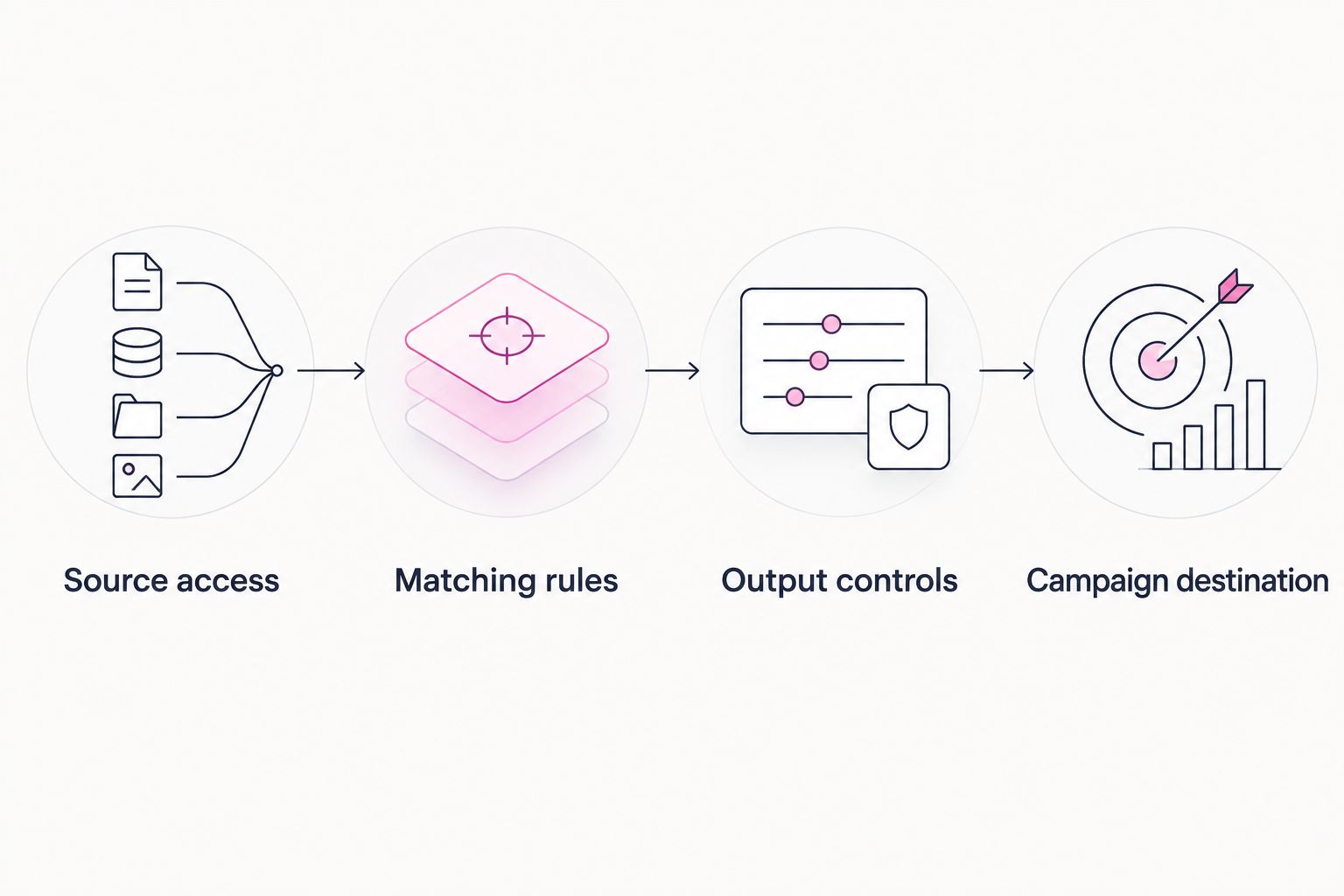
Warehouse access and campaign activation are separate approval points.
Expected result: You can demonstrate what enters the collaboration, what leaves it and who is responsible when either changes.
For Cake.Shop enquiries, bring this handoff record rather than a generic request to “connect our data”. State the source location, matching specification, intended output and buying destination. That gives the discussion a concrete technical scope without assuming a particular connector exists.
Best for recurring audience workflows: Refresh the governed input on an agreed schedule, then use the connection’s documented refresh behaviour. The advantage is repeatability; the trade-off is another production process that needs monitoring.
A BigQuery input refresh does not prove that a provider has reread it or that a buying platform has updated its audience. Verify each stage separately.
For your 2026 operating plan:
For measurement-only work, retain the same input and output controls but omit the audience destination. An aggregate report does not require an activation export.
Your browser session and the connection can use different identities. Check the identity performing the failed operation, then inspect its data access and, where required, job-execution permissions. Do not fix the error by granting broad administrator access.
Confirm the exact project and dataset identifiers, query-job location and provider-supported location. A dataset existing in another region does not make it accessible to the current query job. Correct the configuration before considering data relocation.
Check identifier type, whitespace handling, case normalisation, encoding, missing values and eligibility filters. Compare equivalent populations. Do not remove exclusions simply to increase the match count.
Check whether the collaboration permits activation at all. Then inspect destination identifier requirements, account permissions and audience rules. Aggregate-only access cannot be treated as permission to export person-level records.
Check every retained copy and refresh stage, not only the BigQuery source. Follow the agreed deletion process in the collaboration and destination, then verify completion with the responsible owners.
Start with one defined use case: audience overlap, campaign measurement or approved audience activation. Each needs a different output contract. Adding every use case at launch makes permissions harder to review.
Cake.Shop’s modular programmatic advertising platform spans buying and reporting, rich media and DOOH creative, data clean rooms and direct publisher supply. Scope those components separately: audience eligibility does not establish creative compatibility, inventory access or measurement methodology.
Use the data clean room for media agencies guide to frame agency responsibilities before extending the workflow across clients. Keep each client’s permissions, identifiers and destination accounts distinct.
How do I connect BigQuery to a programmatic data clean room?
Use the clean-room provider’s documented BigQuery connection or a supported BigQuery-native clean-room workflow. Prepare a restricted input, configure matching and output rules, then validate the permitted analysis before enabling any separate activation handoff.
Does sharing a BigQuery dataset create a data clean room?
No. Dataset sharing grants access; a clean room also requires controls over collaboration, analysis and outputs. Configure those controls explicitly rather than relying on dataset permissions alone.
Can I activate audiences directly from a BigQuery clean room?
Only when the collaboration and destination support an authorised activation workflow. Aggregate measurement access does not establish permission or technical support for exporting matched identifiers.
Do I need hashed email addresses for the integration?
Not necessarily; the matching specification determines the required identifier. If hashed email is required, both parties must agree on normalisation, hashing and encoding. Hashing does not remove consent or governance responsibilities.
Can the BigQuery dataset and query job use different locations?
A BigQuery query job must use a location compatible with the datasets it references. Confirm the source location and the provider’s processing requirements before configuring the connection.
Will a BigQuery update automatically refresh my campaign audience?
Not necessarily; source updates, provider refreshes and destination updates are separate stages. Verify the documented refresh behaviour and monitor each stage, including removals.
What should an agency prepare before discussing the integration?
Prepare the source location, connection method, identifier specification, eligibility rules and intended output. Add the destination account and activation requirements if audience delivery is part of the scope.
Make removal a launch test, not a later support ticket. For a 2026 rollout, demonstrate that an ineligible test record stops flowing through the authorised workflow. A successful addition proves connectivity; a successful removal tests operational control.
Build a dynamic creative stock level trigger with validated inventory, approved assets and verified activation. Follow setup, testing and fallback guidance.
Read more →Google Ad Manager publisher supply integration needs a verified route. Map inventory, validate creative delivery and reconcile publisher and buyer reporting.
Read more →Set up a LiveRamp DSP integration with destination checks, audience mapping, suppression tests and reporting controls before activating first-party campaigns.
Read more →Book a 30-minute demo and see exactly how Cake.Shop works — no sales pitch, just the platform.