
OPEN DAILY
OPEN
HONEST
TRUST
LET'S CHAT



Instead of manually exporting customer lists from Snowflake, configure a snowflake data clean room integration that checks permissions, matches eligible records and sends only approved audiences to a confirmed activation destination. For a modular advertising stack, Cake.Shop brings media buying and reporting, rich media creative, data clean rooms and publisher supply into the same planning conversation; confirm the Snowflake connection and destination requirements before implementation.
TL;DR
A data clean room is a controlled environment for collaborating on data under defined access and query rules. It is not automatic permission to move customer identifiers into an advertising platform. An approved analysis and an approved activation are different things.
For your 2026 implementation, separate the workflow into source preparation, collaboration, audience output and media activation. Each boundary needs an owner and a test. Otherwise, a successful match becomes a misleading completion signal while the advertising destination still cannot use the result.
Cake.Shop serves independent agencies and in-house brands seeking a modular programmatic advertising stack. Evaluate the whole route: data permissions, media buying and reporting, creative requirements and publisher supply. A buying interface alone does not resolve the hand-offs between them.
Use the actual controls and approved templates in your chosen deployment. Do not copy interface labels from a different clean room application: Snowflake is the data platform, while the collaboration and activation configuration depends on the implementation you select.
For the 2026 source contract, record the field meanings, transformation specification, eligibility rule and accountable owner. This makes a later change to customer data distinguishable from a change to audience logic.
Expected result: The authorised role can read the intended source, the required keys are populated, and the eligibility query excludes prohibited records. No collaborator or destination has received an unrestricted customer export.
Use COUNT(*) to check row counts and COUNT(DISTINCT …) to investigate repeated matching keys inside the authorised source environment. Counts answer different questions: source rows are not necessarily unique people, and distinct keys are not necessarily addressable advertising users.
Keep diagnostic queries within approved access boundaries. A debugging worksheet is not a reason to paste customer identifiers into tickets, screenshots or shared documents.
Expected result: Both participants agree on the matching specification, the test cases behave as intended and the approved output fits the business purpose. A populated overlap report alone does not pass this checkpoint.
Define each denominator before comparing results. Source eligibility, usable identifiers, matched records and destination-accepted identifiers represent different populations. Treating them as interchangeable hides where the workflow loses coverage.
For your 2026 validation record, preserve the query version and the meaning of each count. Compare like with like after a refresh. A change in a result needs an explanation before it becomes a campaign decision.
Expected result: The receiving account contains the intended audience, ownership is correct and the approved campaign references it. Keep destination acceptance evidence separate from source and clean room validation.
The acceptance sequence is Source preparation, Approved matching, Audience transfer and Campaign checks. Preserve that order: troubleshooting the campaign cannot repair an unauthorised audience output.
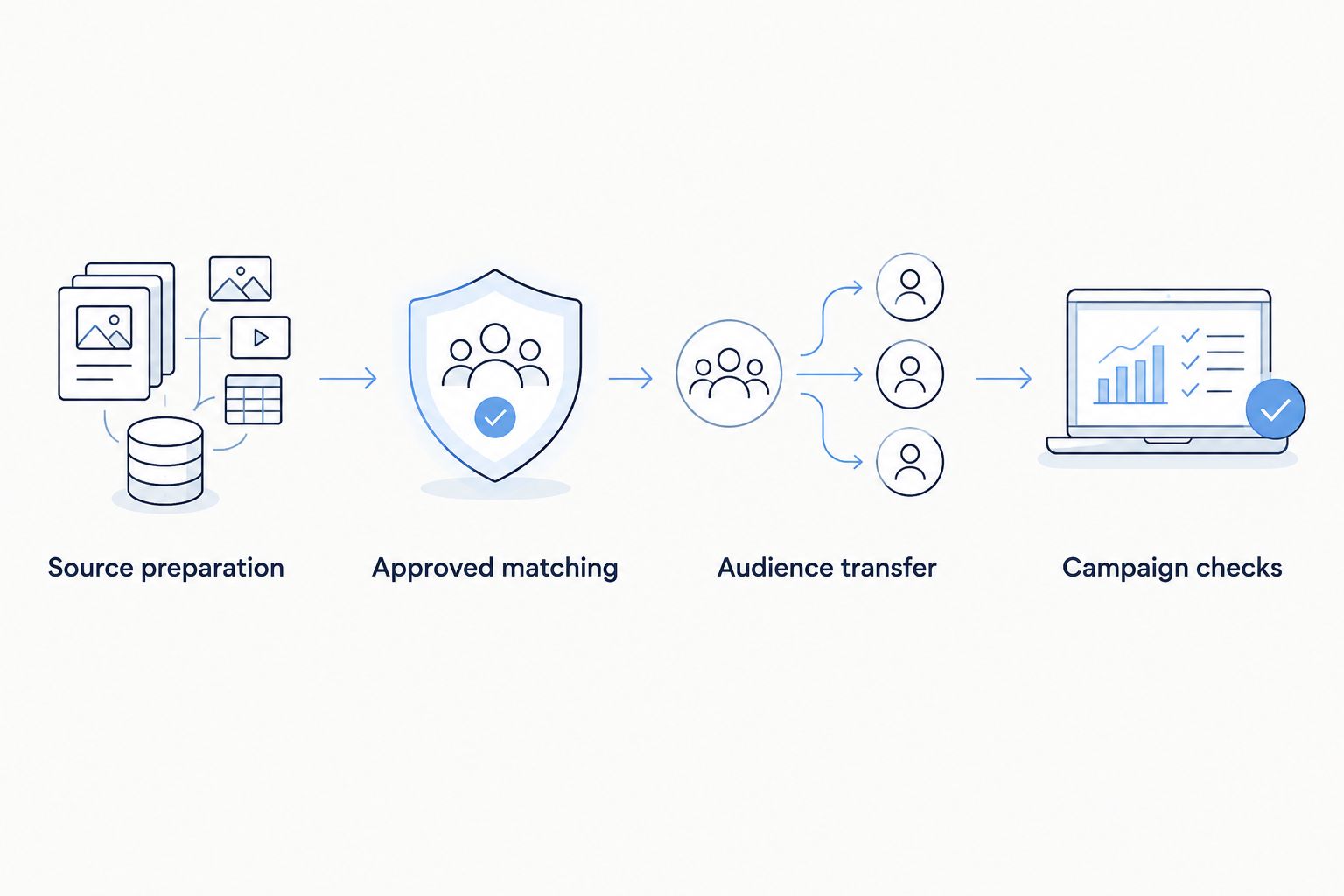
Check permissions and destination acceptance before attaching the audience to a campaign.
Cake.Shop's programmatic advertising platform includes media buying and reporting, rich media creative, data clean rooms and publisher supply. Ask how the approved audience route fits those components rather than assuming that an audience identifier works across every channel.
Choose the campaign objective and creative requirements alongside the destination. Rich media and DOOH creative need their own execution checks; an addressable audience does not establish that the same person-level targeting method applies to DOOH. Confirm the permitted targeting and measurement approach for each channel.
The benefit of modular planning is that you can assess each hand-off separately. The trade-off is that you must define responsibility at every boundary. A platform enquiry should ask who owns matching, transfer, campaign configuration and reporting—not just whether integration is possible.
Expected result: A repeat run updates the intended membership without retaining prohibited records or creating an unintended audience. Failures identify a specific boundary and owner.
Your 2026 runbook should include the audience version, refresh behaviour, approved output route and destination account. A campaign label alone is not enough to reconstruct what was activated.
A recurring source refresh is an adjacent workflow, not a different permission model. Use it when audience membership depends on changing customer eligibility and the approved transfer route supports the required updates.
Approved snapshot
Recurring refresh
For recurring refresh, start the collaboration after the relevant source update completes. If a source update fails, do not label the previous audience as newly refreshed. If destination acceptance fails, preserve the last confirmed status and investigate before retrying.
Use an approved snapshot for the first validation, then add recurring refresh after removal and retry tests pass. The snapshot simplifies diagnosis; recurring refresh adds operational responsibility, not a shortcut around approval.
Expand the workflow only after the initial route passes its checks. Add another destination, client account or channel as a separate acceptance path with its own identity requirements and owner.
For a Cake.Shop programmatic advertising enquiry, describe your source data, approved collaboration purpose, receiving account and required reporting. Include creative and publisher supply requirements so the discussion covers the full stack rather than only the audience transfer.
Discuss your activation workflow
Explain your source, permissions, destination and reporting requirements.
How do I integrate Snowflake with a data clean room?
Prepare an authorised source, agree matching and output rules with the collaborator, and configure the approved clean room workflow. Validate the output permissions before connecting an advertising destination.
Does a successful clean room match create an activated audience?
No. Matching establishes an approved result; activation also requires permitted audience output, a supported transfer route and destination acceptance.
Can I send hashed email addresses straight to an advertising platform?
Only when the transfer is authorised and the destination accepts the specified format. Hashing does not establish consent, permitted use or compatibility with the destination.
Does this guide establish a native Cake.Shop Snowflake connector?
No. Confirm the supported Snowflake connection, clean room workflow and activation destination with Cake.Shop before implementation; do not infer connector support from the platform's clean room offering.
Should I use a snapshot or a recurring audience refresh?
Use a reviewed snapshot for initial validation and recurring refresh when changing eligibility requires ongoing updates. Recurring refresh also needs tested removals, retry behaviour and operational monitoring.
What should an independent agency check before activating client data?
Check client authorisation, collaborator permissions, audience ownership and destination account access. Agency administrator access does not replace approval for the client's intended data use.
What belongs in a 2026 clean room acceptance checklist?
Include source eligibility, matching rules, permitted output, destination acceptance, campaign attachment, removals and retry behaviour. Keep evidence for each boundary rather than treating a completed transfer as end-to-end success.
The most revealing acceptance test is a removal, not an addition. Adding an eligible record proves that the route can grow an audience; removing a newly excluded record checks whether the route respects changing permission and eligibility. Put that test in your 2026 launch checklist before enabling recurring activation.
Salesforce CRM programmatic advertising integration needs tested audience rules. Connect data, validate matching and automate exclusions before campaigns launch.
Read more →Snowflake data clean room integration needs approved outputs before activation. Follow source, matching, transfer and refresh checks for an agency-ready workflow.
Read more →Choose a data clean room for media agencies by workflow, not hype. Define permissions, test matching and connect approved findings to buying and reporting.
Read more →Book a 30-minute demo and see exactly how Cake.Shop works — no sales pitch, just the platform.