
OPEN DAILY
OPEN
HONEST
TRUST
LET'S CHAT



Instead of manually rebuilding contact lists for every campaign, connect HubSpot CRM data to programmatic targeting through a permissioned audience export or supported integration, then reconcile additions and removals. The workflow is HubSpot segmentation, approved identity matching, destination audience creation and campaign activation—not simply connecting an advertising account.
TL;DR
HubSpot records describe customer relationships. A demand-side platform, or DSP, buys advertising against identifiers and inventory it can address. Your integration must translate between those systems without losing eligibility rules, exclusions or ownership of the data.
For a 2026 implementation, distinguish three different outcomes: uploading records, matching an audience and delivering advertising. A successful upload proves only the first. Matching depends on the destination’s supported identifiers; delivery also depends on campaign settings and accessible inventory.
Cake.Shop provides modular media buying and reporting, rich media and DOOH creative, data clean rooms and publisher supply. It introduces swweetshop as the platform that powers in-housing. Treat CRM activation as one part of that stack, not evidence of a native HubSpot connector or an automatically supported identity route.
Cake.Shop serves independent agencies and in-house brands building modular programmatic advertising stacks. For an enquiry, bring the proposed audience rules and destination requirements, not just a request to connect HubSpot.
Keep production credentials and customer records out of shared planning documents. Use approved storage and access controls for any exported files, including temporary copies.
There is no universal HubSpot-to-programmatic connection. Select the route your destination actually supports, then document its limitations in your 2026 implementation plan.
Controlled file transfer
Supported connector or API integration
Clean-room-mediated workflow
Use a controlled test before automating any route. A connector does not fix a poorly defined audience, and a clean room does not automatically create an addressable audience.
Where collaboration requires restricted data access, review the data clean room guide for media agencies. Keep measurement permissions separate from activation permissions: permission to analyse overlap does not itself authorise advertising use.
Start with 1 audience and one explicit purpose, such as excluding existing customers from an acquisition campaign. A narrow test is easier to reconcile than several overlapping prospect and customer audiences.
Expected result: You have a reproducible HubSpot audience whose members satisfy both the business rule and the approved data-use rule.
Avoid using free-text sales notes as targeting inputs. They introduce inconsistent classification and can contain information that has no place in an advertising audience.
The transfer connects customer records to the destination’s accepted identity format. It does not guarantee that every record becomes reachable.
Expected result: The destination accepts the intended schema, and you can explain the difference between submitted, accepted and matched records.
The workflow has four checkpoints: Audience rules, Identity preparation, Destination audience and Campaign controls. A failure at one checkpoint should stop the next action rather than silently passing incomplete data into a live campaign.
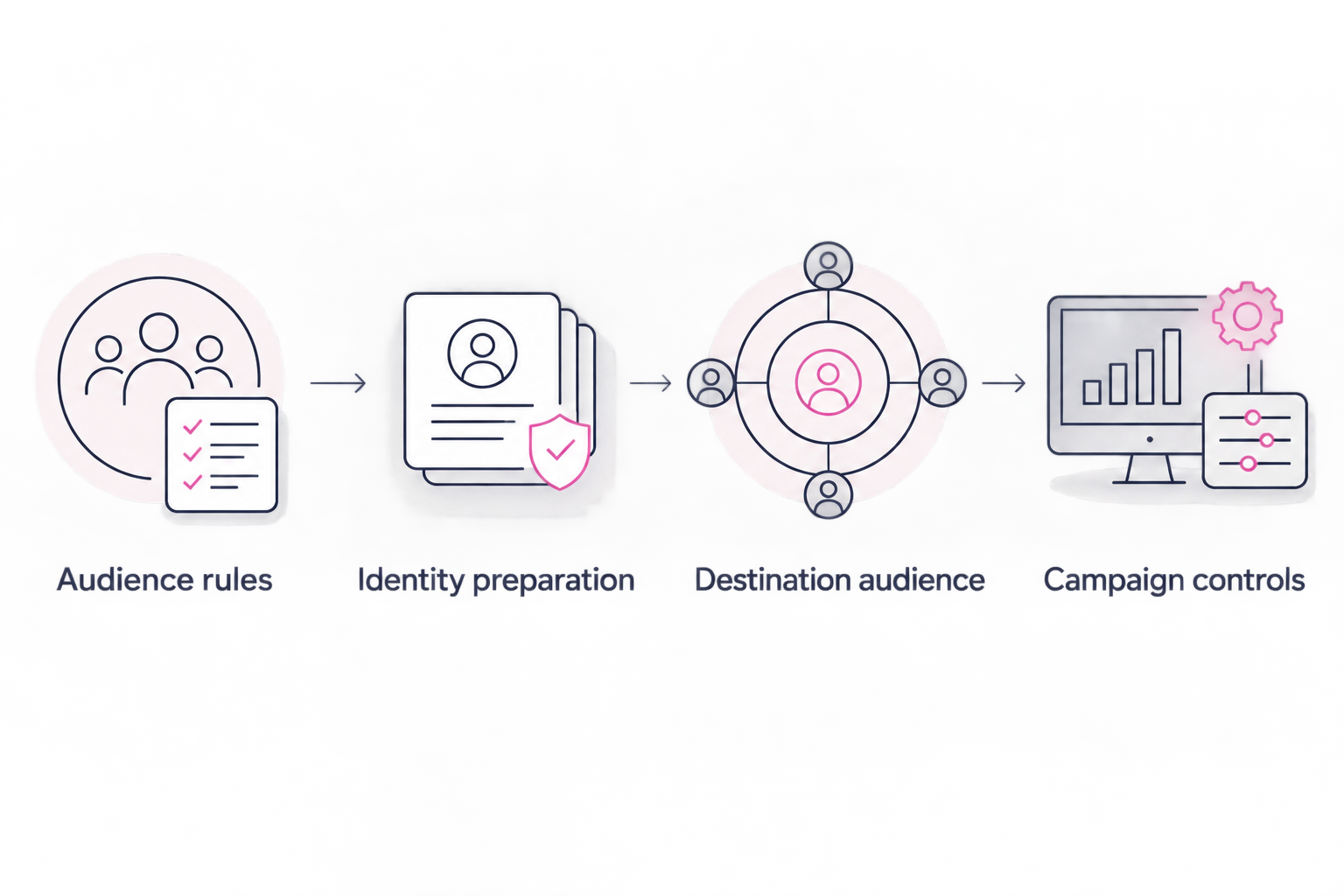
Validate each checkpoint before passing data or audience instructions to the next.
Hashing is a transformation, not a permission mechanism. In a 2026 privacy review, evaluate the identifiers, recipients, purpose and retention arrangements—not just whether the file contains readable email addresses.
Destination interfaces differ. Use the documented audience-import, inclusion and exclusion controls in your chosen platform; do not assume a button or audience type exists because another DSP has it.
Expected result: The audience is attached to the right campaign, in the right role, with its processing status and expansion settings understood.
For Cake.Shop programmatic advertising enquiries, specify whether you need audience activation, suppression, measurement or all three. Also state the intended creative formats and publisher environments. Those requirements determine what needs verification across buying, reporting, creative and supply.
Recurring targeting needs a membership lifecycle, not just an upload schedule. Choose an update cadence that reflects your sales process and the destination’s documented processing behaviour.
Expected result: You can identify the current audience version, show how removals propagate and stop activation when the process fails.
Run a 7-day pilot as a practical review window before widening scope. This is a recommended observation period, not an integration guarantee; extend the pilot if it does not include a complete membership-change and removal test.
Contact-based targeting and deal-based decisions are different workflows. A deal belongs to a sales process; the advertising destination still needs eligible people or another supported audience identifier.
For a deal-stage workflow, first define which associated contacts qualify. Do not assume every contact at an organisation shares the same buying role or advertising permissions.
If you automate this variant, verify that the available HubSpot automation and destination integration support the required changes. Include re-entry and removal behaviour in the test; changing the trigger alone does not complete the workflow.
Inspect accepted-record and matched-record results separately. Confirm the identifier type, preparation rules, regional support and any documented audience thresholds. A valid file is not proof of identity overlap.
Check the integration’s last successful run, authentication and processing status. Confirm that the configured operation updates an existing audience rather than creating a separate audience each time.
Inspect the exclusion’s campaign scope and the destination’s processed membership version. Confirm that the integration sends removals and additions correctly, then check whether the campaign is using the intended audience rather than an older copy.
Check geography, inventory, identity support and campaign restrictions. Matching and delivery are separate checks; do not weaken eligibility rules to manufacture reach. Escalate documented destination errors to the platform owner.
Apply the approved suppression or deletion process across every recipient and stored copy that falls within the request. Stopping future exports alone does not address data already transferred. Record completion through the organisation’s privacy process.
Once membership and removals work, expand the campaign design—not the amount of CRM data exported. In your 2026 rollout plan, separate audience ownership, creative approval, publisher selection and measurement responsibilities.
Cake.Shop’s modular stack brings media buying and reporting, rich media and DOOH creative, data clean rooms and publisher supply into the planning discussion. The trade-off is configuration responsibility: the team still needs to verify integrations, identity compatibility and operating controls for its use case.
Do not carry a person-level CRM targeting assumption into every channel. For example, a DOOH plan needs its own audience, location and measurement design rather than an assumption that a screen placement targets an uploaded individual.
For a technical enquiry, prepare the source-property map, transfer specification, intended campaign controls and removal test. That gives the commercial discussion a defined scope and makes unsupported assumptions visible before implementation.
Can I connect HubSpot directly to any programmatic DSP?
No. A direct connection requires a supported integration and compatible audience-import method at the destination. Otherwise, evaluate an approved file-transfer or API route without assuming HubSpot’s advertising connections cover that DSP.
What data do I need for HubSpot CRM programmatic targeting?
You need eligible audience membership and the identifiers accepted by the destination. Export only approved fields, and document permission, formatting and removal requirements before transferring records.
Does hashing HubSpot email addresses make them anonymous?
No. Hashed email addresses used for matching should not be treated as anonymous simply because the original text is unreadable. Hashing does not replace permission checks, access controls or retention rules.
Can I exclude existing customers from acquisition campaigns?
Yes, where the destination supports a compatible customer-exclusion audience. Define customer membership in HubSpot, apply the audience as an exclusion and test that membership changes reach the campaign.
How often should my CRM audience refresh?
Set the refresh cadence according to your business process, permissions and the integration’s documented behaviour. Monitor both additions and removals; a frequent add-only upload does not keep membership accurate.
Do I need a data clean room to activate HubSpot audiences?
Not necessarily. A supported, approved direct transfer can serve an audience workflow. Evaluate a clean room when the collaboration or measurement requirements call for restricted data access, and verify activation permissions separately.
Does Cake.Shop have a native HubSpot connector?
This guide does not establish a native HubSpot connector for Cake.Shop. Confirm the supported transfer method, identifiers, destination controls and removal process before committing to an implementation.
Test an exit before celebrating an entry. For your 2026 launch, make successful removal of an approved test record a release condition. An audience that accepts customers but cannot reliably stop using their records is not ready for recurring activation.
Programmatic advertising for igaming brands starts with market eligibility. Plan compliant supply, creative approvals and measurement before scaling spend.
Read more →HubSpot CRM programmatic targeting needs verified data routes. Follow the setup, identity checks and removal tests before activating customer audiences.
Read more →Segment CDP cookieless activation starts with consent and supported identifiers. Follow the workflow for audience mapping, suppression and measurement.
Read more →Book a 30-minute demo and see exactly how Cake.Shop works — no sales pitch, just the platform.