
OPEN DAILY
OPEN
HONEST
TRUST
LET'S CHAT



Instead of manually exporting customer lists, build a Segment CDP cookieless activation workflow that checks consent, maps permitted identifiers and sends eligible audiences through a supported activation route. Connect that route to campaign targeting, suppression and measurement—not just an upload that nobody checks again.
TL;DR
A customer data platform, or CDP, organises customer events and profiles. A demand-side platform, or DSP, buys advertising inventory. Moving data between them does not automatically establish permission, resolve identity or make a customer reachable on publisher inventory.
Cake.Shop provides modular programmatic advertising technology spanning media buying, rich media creative, data clean rooms and publisher supply. Its swweetshop platform powers in-housing. For this workflow, assess the connection across that full stack rather than treating audience delivery as the finish line.
The rule for your 2026 implementation: prove permission, audience removal and destination usability before spending against an audience. A successful API response proves receipt, not campaign eligibility.
Use synthetic records for initial testing. Do not use real customer details merely because a destination offers a test interface.
Start your 2026 setup at the event source, not the campaign screen. An audience cannot correct an event that attaches behaviour to the wrong person or ignores a consent change.
userId and anonymousId serve different purposes; do not substitute one for the other simply to populate a field.Expected result: You can trace each test event to the intended profile and explain why that profile is permitted—or blocked—for the stated advertising purpose.
Keep raw identifiers out of screenshots and support tickets. Debugging should not create a second, uncontrolled customer database.
Build a narrow audience with explicit exit rules. For an initial workflow, a consented customer who has shown interest in a category is easier to validate than a broad modelled prospecting segment.
Expected result: You have 2 explicit outcomes—include or exclude—with a documented reason for each test profile. An excluded profile must not become eligible merely because it has a usable identifier.
Choose the route by its targeting purpose and supported data contract. These are workflow options, not interchangeable ways to reach the same people.
Consented identity activation
Contextual planning
Clean-room collaboration
Choose the route before designing the export. A clean room is not an automatic identity bridge, and a contextual campaign is not a customer-list match.
Treat your 2026 destination mapping as a contract between systems. Document what leaves Segment, what receives it and what the buying platform can actually use.
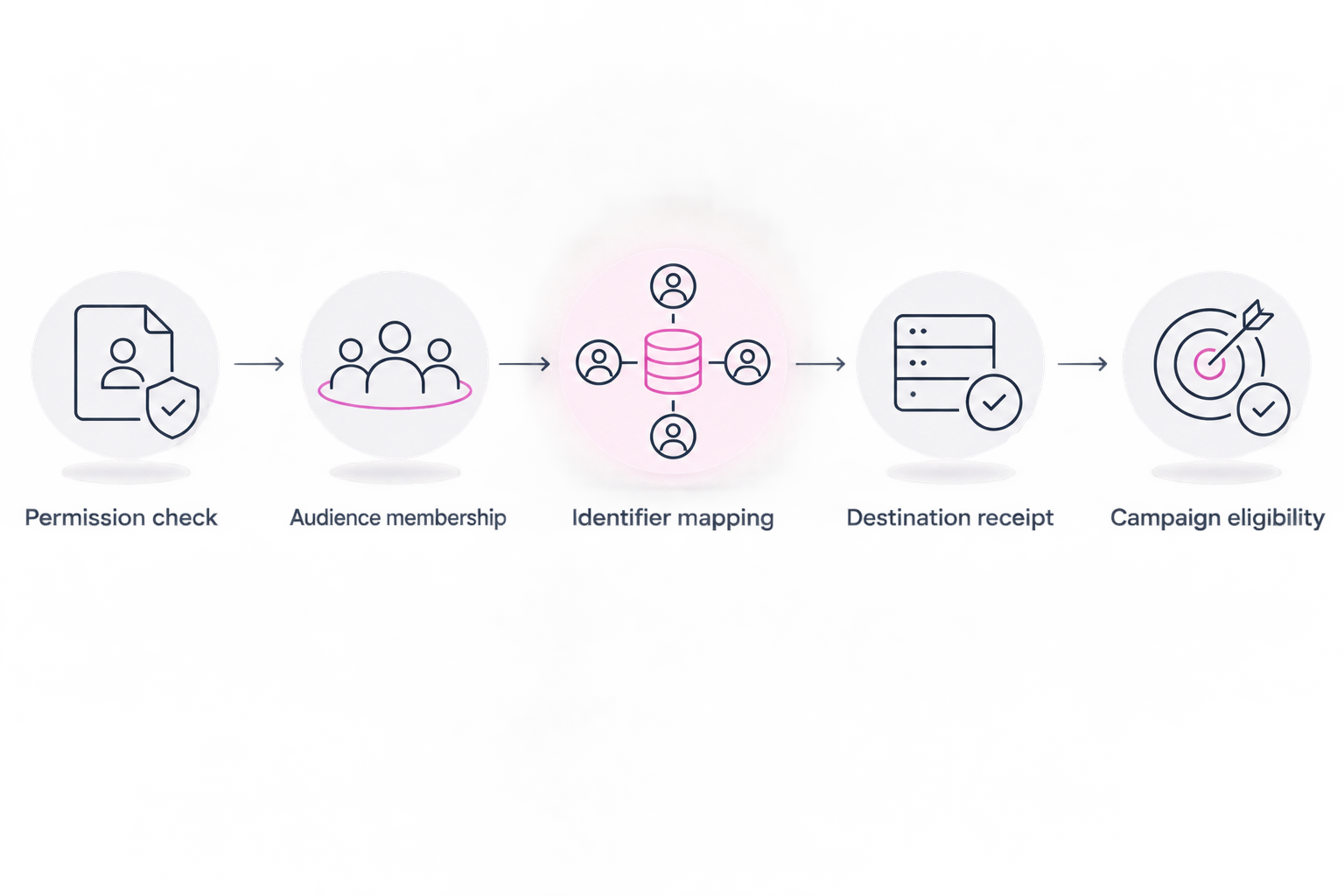
Destination receipt and campaign eligibility are separate checks.
Expected result: A permitted synthetic profile reaches the intended destination, while the blocked profile does not. The withdrawal test removes or disables membership through the destination's supported mechanism.
Do not treat these steps as evidence of a native Segment-to-swweetshop connector. Require confirmation of the supported integration route, identifier contract and removal behaviour when scoping a Cake.Shop deployment.
For the wider architecture, see how programmatic advertising works without third-party cookies. Removing third-party cookies changes the available signals; it does not remove the need to verify each connection.
Connect the audience to a controlled media test. Keep media delivery, creative and measurement definitions separate so that a failure in one does not get disguised as success in another.
Expected result: Your 2026 pilot has an explainable path from permitted source data to campaign use and reporting. You can identify where a discrepancy occurs without rebuilding the entire workflow.
A full stack gives you more configuration decisions, not permission to skip them. Name the person responsible for each hand-off before launch.
A useful second workflow removes customers from acquisition activity when they convert or withdraw advertising permission. It uses the same identity and destination contract, but its priority is correct exclusion rather than audience growth.
Expected result: A customer who becomes ineligible stops qualifying through the tested route. Handle deletion requests through a separate, documented process; audience removal is not proof of data deletion.
Check destination authorisation, identifier acceptance and payload errors first. Then inspect destination processing rules and any minimum audience requirements in its documentation; a populated CDP audience does not guarantee a usable media audience.
Inspect audience eligibility, campaign targeting intersections, exclusions and available inventory. Do not widen permissions or remove necessary suppression to make delivery start.
Check whether the integration sends removals or only additions. Confirm that removal uses the same identifier representation as inclusion, and test the receiving system's documented removal process.
Compare definitions before totals. Profile merging, rejected identifiers, audience timing and destination eligibility can produce different populations; reconcile the same processing window and inspect test records through each stage.
Trace retries and repeated source events using the deduplication method supported by your measurement destination. Make event handling idempotent where supported: receiving the same logical event again should not create another conversion.
Expand only after the pilot passes entry, exclusion and withdrawal tests. Add a new audience, destination or creative format separately so that you can isolate changes.
For an independent agency, document client-level access and ownership before repeating the setup across accounts. For an in-house brand, assign operational responsibility for taxonomy changes, consent updates and campaign suppression. The commercial enquiry should establish supported integrations, data ownership, reporting access and exit requirements—not just whether an audience can be uploaded.
Make the 2026 handover a working configuration record. Include the event dictionary, identifier contract, removal tests, destination owner and rollback procedure.
Can Segment CDP activate audiences without third-party cookies?
Yes, when a supported destination can use the permitted data without relying on third-party cookies. Segment audience membership alone does not establish identity matching, publisher reach or permission.
Does cookieless activation mean I do not need consent?
No. Cookieless describes a technical dependency, not a legal permission. Assess the purpose, identifiers, recipients and applicable privacy requirements before activating customer data.
Can I connect Segment directly to Cake.Shop?
Confirm the supported integration route before implementation. The deployment needs an agreed identifier contract, audience-update method and removal process; this workflow does not establish a native connector.
Is hashed email anonymous data?
Hashing an email address does not automatically make it anonymous. If the value remains linkable to a person, treat it under the applicable personal-data requirements and the recipient's documented rules.
Why is my destination audience smaller than my Segment audience?
The destination applies its own identifier acceptance, matching and eligibility rules. Compare the same processing window and trace controlled records through receipt, acceptance and campaign eligibility.
Do I need a data clean room for this workflow?
No, not for every implementation. Use a clean room when the approved collaboration or measurement design requires controlled joint data use; verify its outputs and activation permissions separately.
Can I use the same workflow for contextual advertising?
Use the same governance discipline, but change the activation design. Contextual targeting selects content environments rather than reproducing customer-level audience membership, so it cannot replace an identity-based suppression list.
Test removal before testing scale. A workflow that adds the right customer but cannot remove that customer is not ready for production. Make withdrawal a launch gate, not a support ticket after the campaign starts.
Programmatic advertising for igaming brands starts with market eligibility. Plan compliant supply, creative approvals and measurement before scaling spend.
Read more →HubSpot CRM programmatic targeting needs verified data routes. Follow the setup, identity checks and removal tests before activating customer audiences.
Read more →Segment CDP cookieless activation starts with consent and supported identifiers. Follow the workflow for audience mapping, suppression and measurement.
Read more →Book a 30-minute demo and see exactly how Cake.Shop works — no sales pitch, just the platform.